Electronic Drum Set and Glove

Final Dave has written an extensive blog post detailing how to create your own electronic drum set.

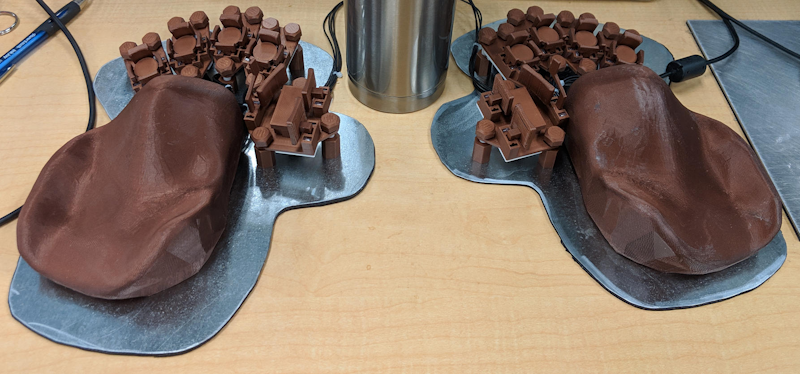
Whereas a typical electronic drum kit from the likes of Zildjian, DW, or Roland might cost $5K+, Dave’s DIY drums ended up around $300 including the $150 stand (though not including the laptop required to run the Digital Audio Workstation software). The system largely consists of piezo disks connected to a Teensy 3.2, in turn connected to a laptop via USB MIDI. The laptop then uses the MT Power Drum Kit VST virtual instrument plug-in with the Reaper DAW to produce real drum sounds. These can of course be listened to over headphones, which means that depending on what you select for what Dave refers to as “something to hit with your drumsticks”, you should end up with a practice kit that won’t annoy your neighbours. Dave chose LaserDiscs, which is both a pretty cool way to put some new funk into “obsolete” old tech, and, one would imagine, pretty cyberpunk-looking in practice. Prior to embarking on the project, Dave “had almost no understanding of electronics whatsoever”, so the project write-up is written with accessibility in mind, and includes links to all of the required equipment, as well as parts, and of course the code to make it all work. Check it out on Dave’s blog, and as a fun bonus, check out this wearable offshoot project: drum gloves!

PowerProf Power Monitor

The motivations for and outcomes of vaping are myriad, but this project caught our attention as perhaps one of the more unexpected.

Beginning as GufuGud (Icelandic for “Vapor God”), an open-source software and hardware solution for the measurement of vaporizer atomizer coils, it became apparent that the same data acquisition of precision voltage and current measurement could be applicable to numerous other cases. Using the same Ti INA260 Precision Digital Current and Power Monitor, connected to a Teensy 3.6 via I2C, the PowerProf project collects voltage and current data, serializes it, and sends it to a PC over USB, where it can be analyzed using a collection of Python tools. The INA260 current sensor can handle 0-36V and up to 15A continuous current, with 16-bit 1.25 mA / 1.25 mV resolution. This example output shows a high-end Evolv DNA 100C vaporizer (top) compared to a cheap $20 Chinese box (bottom):

Software and hardware repos can both be found on GitHub.

Sidereal – Art Installation

Branden Hall (with assistance from his son, Kai!) has created a story-driven interactive installation for the Constellation regional Burning Man event.

Inspired by narratives like Carl Sagan’s Contact and The Last Starfighter, the Sidereal hexagonal shard is presented as an artifact of unknown origin. Warning signs prevent access to the artifact during the day, with accompanying fictional logs of a local university’s discovery and investigation of the relic. At night, however, the device begins glowing and playing melodies, and a “missing” poster that reveals the mysterious disappearance of the investigation’s lead scientist is “discovered.” Visitors then attempt to unlock the puzzle contained within by observing the results of their interactions with the device, and the “truth” about its origin is revealed to those who complete all six stages.

Source code for the Teensy 3.6-powered enigma can be found on GitHub.

Rebrained Retro Robot

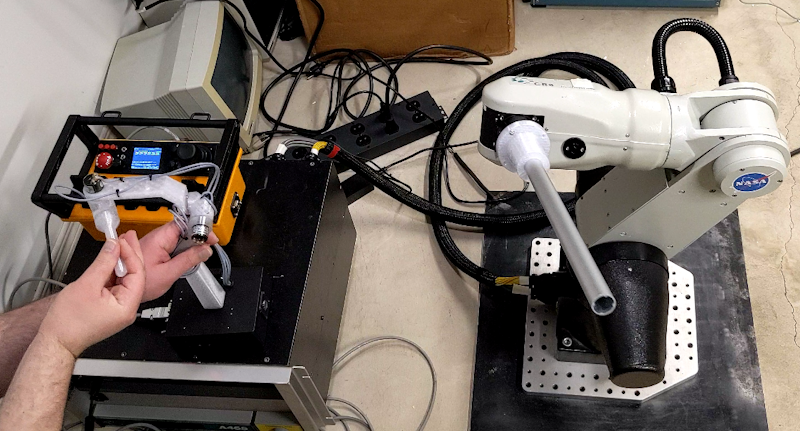
Mechanical engineer and YouTuber Clay Builds has is restoring a late-90s robot using a Teensy 4.0 and ESP32.

The Nomadic Technologies N150 was purchased at auction in a non-functional state. Clay is attempting to “rebrain” it with modern microcontrollers in order to use the original ultrasonic rangefinders and bump sensors in conjunction with modern SLAM (simultaneous localization and mapping) algorithms.

Teensy is used to read the ultrasonic array, limit switches and motor encoders, with the latter used for navigation via dead reckoning. It is also used for the motor drivers, which provide locomotion. Source code for the current iteration can be found on GitHub, and a detailed video can be found below.

Power User Keyboard

charje has created the Power User Keyboard, a unique custom keyboard with a non-conventional bottom row of keys. The result of the extensive documentation of the project is effectively a general-purpose guide for the creation of Teensy-based custom keyboards.

With full detail of parts, cost, and tools to create the layout, case, and firmware (automatically generated by QMK), charje’s project write-up provides a complete end-to-end roadmap. We’d love to see a 7-row ThinkPad-style keyboard implemented along similar lines! Check out the project’s sourcehut page for more details.

USB MIDI How-To

Brett has put together a ten-minute video guide to using USB MIDI with Teensy. The succinct presentation shows how to interface a classic 5-pin MIDI DIN connector to a modern Digital Audio Workstation (DAW) — in this case, Cakewalk — using Teensy’s USB MIDI capabilities.

Brett details the code for both sending and receiving MIDI data, allowing recording of a MIDI device to a DAW, and playback from the DAW to the device. Brett points out that such an interface could just be purchased “for a tenner,” but what would be the fun in that? Moreover, this basic project can serve as the foundation of all kinds of MIDI tools and contraptions. Complete instructions, as well as code, can be found in the video below.

T-COMPUTER Miniature Computer

Jean-Marc, is it it once again, this time with the tiny, Teensy 4.1-based, T-COMPUTER.

Jean-Marc is the creator of the Atari ST Emulator and MAME Arcade Machine Emulator. His latest project, The T-COMPUTER is a full-featured handheld computing platform, with 42 keys (including D-pad and buttons for gaming) and a built-in 320×240 TFT display. While its small size makes it ideal for on-the-go use, VGA and 16-bit stereo DAC outputs, as well as USB host input for keyboard/mouse/etc., as and a DB9 Atari-style joystick input, make for a great desktop experience as well. As always with Jean-Marc’s projects, the schematic, source, BOM, assembly instructions, and more can be found on GitHub. A detailed demo of the computer’s capabilities can be enjoyed below.

Nixie Tube Audio Spectrum Visualizer

Andrei Holingher has built a Nixie tube spectrum analyzer with an S/PDIF input. Inspired by Will Yager’s Rust-based Nixie Tube Audio Meter, the project ports that functionality to Arduino-compatible code, incorporating necessary hardware changes along the way.

Four SAMD21-based QT Py clones drive four tubes each, while a VN7140 Power Management IC distributes power. LM1117 voltage regulators power the 5V and 3V3 microcontrollers, with NCH8200HVs boosting power to the Nixies. The digital optical audio signal is processed by the Teensy Audio Library, then band-filtered into bins, represented by the tubes, with a potentiometer on each for further calibration. Schematics, BOM, firmware, and more can be found on GitHub, and a mesmerizing demonstration can be seen below.

Self-Balancing Mecanum Bike

YouTuber James Bruton has created a “screw bike” in the vein of screw-drive tanks, with the additional feat of making it self-balancing. Building upon an earlier front-omni-wheeled bicycle, the latest model can move in any direction, thanks to its four mecanum wheels.

In addition to its steel frame and 3d-printed wheels, the bike features Teensy 4.1 boards to control its ODrive motors via CAN bus. BNO08x IMUs work with the Teensy to help keep things upright. The whole crazy thing can be seen in action below, with source code and CAD files available on GitHub.

Programmable Musical Instrument

Andy Belov has created a general-purpose programmable musical instrument.

With 18 touch sensors, a touchscreen, MIDI, and Bluetooth, it is intended as a blank canvas (or control surface!) on which to create new musical experiences.

Based around a Teensy 3.6 and Audio Adaptor Board, the device adds two custom PCBs and a fun enclosure to create a music-making device around the size of a handheld game console.

It can currently simulate a saxophone, flute, drums, trumpet, or steel drums. Source code can be found on GitHub, and demonstrations can be seen in the videos below.