

Servo Library
The Servo or PWMServo library allows you to connect servo motors, commonly used in remote control airplanes and other vehicles.
| Download: | Servo is included with Arduino PWMServo is included with the Teensyduino Installer PWMServo latest development is on Github |
Hardware Requirements
Servo can control up to 12 motors on most Teensy boards, using any pins. On Teensy++ 2.0 & 1.0, Servo can control up to 24 motors.PWMServo can control up to 3 motors on AVR-based Teensy, using specific PWM pins. On ARM-based Teensy, all PWM pins may control motors with PWMServo.
| Board | Servo Library | PWMServo Library | |||
|---|---|---|---|---|---|
| Usable Pins | 1-12 Motors: Unusable analogWrite() | 13-24 Motors: Unusable analogWrite() |
Usable Pins | Unusable analogWrite() |
|
| Teensy 4.1 | Any | none | - | 0-15, 18-19, 22-25, 28-29, 33, 36-37 | see below |
| Teensy 4.0 | Any | none | - | 0-15, 18-19, 22-25, 28-29, 33 | see below |
| Teensy 3.6 | Any | none | - | 2-10, 14, 16-17, 20-23, 29-30, 35-38 | see below |
| Teensy 3.5 | Any | none | - | 2-10, 14, 20-23, 29-30, 35-38 | see below |
| Teensy 3.2 & 3.1 | Any | none | - | 3-6, 9, 10, 20-23, 25, 32 | see below |
| Teensy 3.0 | Any | none | - | 3-6, 9, 10, 20-23 | see below |
| Teensy LC | Any | none | - | 3, 4, 6, 9, 10, 16, 17, 20, 22, 23 | see below |
| Teensy++ 2.0 | Any | 14, 15, 16 | 14, 15, 16, 25, 26, 27 | 25, 26, 27 | 25, 26, 27 |
| Teensy 2.0 | Any | 4, 14, 15 | - | 4, 14, 15 | 4, 14, 15 |
| Teensy++ 1.0 | Any | 14, 15, 16 | 14, 15, 16, 25, 26, 27 | 25, 26, 27 | 25, 26, 27 |
| Teensy 1.0 | Any | 15, 17, 18 | - | 15, 17, 18 | 15, 17, 18 |
Both Servo and PWMServo use hardware timers. On AVR-based Teensy, timer usage causes specific PWM pins to become unusable with analogWrite(). On ARM-based Teensy, Servo uses other timers, so PWM pins are not impacted. PWMServo on ARM-based Teensy slows the PWM to only 50 Hz for a group of PWM pins controlled by the same timer. You can still use those other PWM pins with analogWrite(), but the 50 Hz PWM frequency is too low for many applications.
PWMServo is much more tolerant of interrupt latency that Servo. Libraries which disable interrupts are incompatible with Servo, but these can be used with PWMServo.
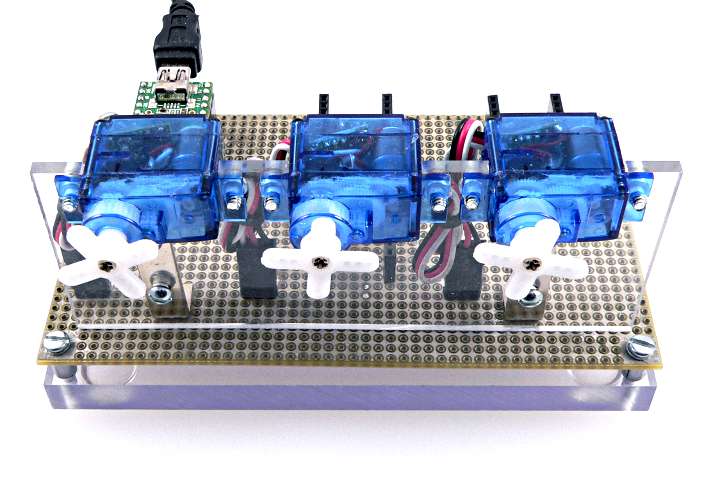
Most Servo motors require +5 volt power, at considerable current. Usually the black wire connects to ground and the red wire to +5 volts. Please check the specifications for your motors to be sure.
A few very small motors, like the ones above, can run from USB power. Direct connection to a PC or Mac or powered USB hub can provide 500 mA of current. Please be careful not to connect too many motors which could have a combined usage higher than 500 mA.
Larger motors will need a separate power supply. Usually power and ground wires should connect as directly as possible from your 5V power supply to the motors. A ground connecton from the motor to Teensy is required. If Teensy runs from USB power, usually +5V motor power should *not* connect to Teensy.
Basic Usage
Servo myservo;Create an instance of the Servo library. You will need to create an instance for each motor, giving each motor a unique name of your choice.
myservo.attach(pin);Specify the pin number where the motor's control signal is connected.
myservo.attach(pin, 1000, 2000);Specify the pin number where the motor's control signal is connected, and the motor's minimum and maximum control pulse width, in microseconds.
Position Control
myservo.write(angle);Move the servo motor to a new angle, between 0 to 180 degrees. Some servo motors are not capable of a full 180 degree travel or have stability problems at the far ends of this range.
Example Program
The sweep example program slowly moves a servo back and forth. This program can be opened from the File -> Examples -> Servo menu. incremented, and written back.
// Sweep
// by BARRAGAN <http://barraganstudio.com>

#include <Servo.h>

Servo myservo;  // create servo object to control a servo
                // a maximum of eight servo objects can be created

int pos = 0;    // variable to store the servo position

void setup()
{
  myservo.attach(20);  // attaches the servo on pin 20
}


void loop()
{
  for(pos = 10; pos < 170; pos += 1)  // goes from 10 degrees to 170 degrees
  {                                  // in steps of 1 degree
    myservo.write(pos);              // tell servo to go to position in variable 'pos'
    delay(15);                       // waits 15ms for the servo to reach the position
  }
  for(pos = 180; pos>=1; pos-=1)     // goes from 180 degrees to 0 degrees
  {
    myservo.write(pos);              // tell servo to go to position in variable 'pos'
    delay(15);                       // waits 15ms for the servo to reach the position
  }
}
Timer Usage
The Servo library uses a timer. Actually, a timer is used for each 12 motors. When the Servo library takes control of a timer, the PWM pins normally controlled by that timer will no longer function correctly.This table can help you avoid using PWM pins which require the timers used by Servo.
| Board | 1st to 12th Servo | 13th to 24th Servo | ||
|---|---|---|---|---|
| Timer Used | PWM Pins Affected | Timer Used | PWM Pins Affected | |
| Teensy 4.0 & 4.1 | IntervalTimer | none | - | |
| Teensy 3.6 & 3.5 | PDB | none | - | |
| Teensy 3.2 & 3.1 | PDB | none | - | |
| Teensy 3.0 | PDB | none | - | |
| Teensy LC | LPTMR | none | - | |
| Teensy++ 2.0 | Timer 3 | 14, 15, 16 | Timer 1 | 25, 26, 27 |
| Teensy 2.0 | Timer 1 | 4, 14, 15 | - | |
| Teensy++ 1.0 | Timer 3 | 14, 15, 16 | Timer 1 | 25, 26, 27 |
| Teensy 1.0 | Timer 1 | 15, 17, 18 | - | |
On Teensy 3.x, Servo uses the PDB timer which can interfere with certain features in the Audio library which require this timer. Servo.cpp can be edited to use the Teensy-LC LPTMR code on Teensy 3.x to solve this problem.
Interrupt Latency
Servo uses precisely timed interrupts to generate the control signals to many servo motors. Normally you do not need to be concerned about these interrupts. However, if your program disables interrupts, or you use a library which disables interrupts for substantial periods of time, Servo's signal accuracy can be degraded. Typical problems involve servo motors making small, unintended movements at infrequent, seemingly random times.Libraries which disable interrupts for long times, likely to cause substantial problems:
- Adafruit_NeoPixel
- SoftwareSerial
- NewSoftSerial
- DmxSimple
- OneWire
More Details
Please refer to the official Servo library documentation for more details.PWMServo developed from the older Arduino Servo library, which previously came from Wiring. The old Servo library was replaced by a newer version written by Michael Margolis. Mikal Hart renamed the original to PWMServo, for use without confict with the newer Servo.