

LiquidCrystal Library
LiquidCrystal lets you use small character type displays. Characters and a limited set of custom symbols can be used.
| Download: | LiquidCrystal (included in Arduino) LiquidCrystalFast (Version 1.1) |
LiquidCrystal & LiquidCrystalFast work with Teensy and Teensy++, and all Arduino boards.
Hardware Requirements
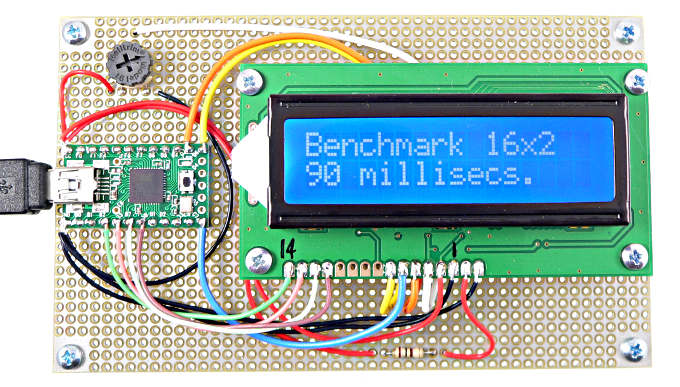 Display using fast 7 signal connection (LiquidCrystalFast) |
| Typical LCD Pinouts: | |
| LCD Pin | Function |
|---|---|
| 1 | Ground (Vss) |
| 2 | +5 Volts (Vdd) |
| 3 | Contrast Adjust (Vee) |
| 4 | RS |
| 5 | R/W (or Ground) |
| 6 | Enable (E) |
| 7 | D0 (no used) |
| 8 | D1 (no used) |
| 9 | D2 (no used) |
| 10 | D3 (no used) |
| 11 | D4 |
| 12 | D5 |
| 13 | D6 |
| 14 | D7 |
| 15 | Backlight Power |
| 16 | Backlight Power |
Slow Connection
Only 6 signal are required, RS, Enable, D4, D5, D6 and D7. The R/W pin must be connected to ground. Pins D0, D1, D2 and D3 are left unconnected.Fast Connection
LiquidCrystalFast can use the R/W pin for faster access. Either way can update the display faster than a human eye can detect, but if your project needs to do other work, less time updating the display may be worth using a seventh pin.Large 4x40 Connection
LiquidCrystalFast can also access large 4x40 displays, which have two enable pins.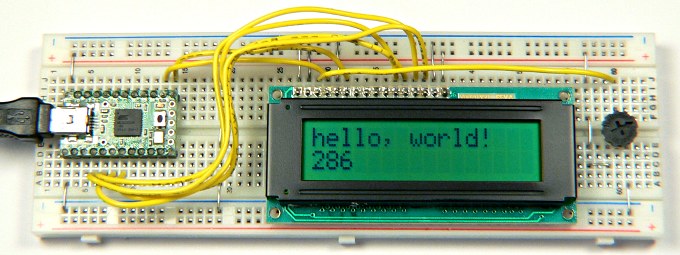 Display using slow 6 signal connection |
Basic Usage
LiquidCrystal lcd(RS, Enable, D4, D5, D6, D7)Create the LiquidCrystal object and specify the 6 pins where the LCD is connected. You can connect more than one display (each to its own pins) and create a separate LiquidCrystal objects for each.
lcd.begin(width, height);Initialize the display and set the size.
lcd.print(anything);Print a number or text. This works the same as Serial.print(), but prints to the LCD.
lcd.setCursor(x, y);Move the cursor to position (x, y). These are zero-based coordinates.
LiquidCrystalFast lcd(RS, RW, Enable, D4, D5, D6, D7)Create the LiquidCrystalFast object, using 7 pins.
LiquidCrystalFast lcd(RS, RW, Enable1, Enable2, D4, D5, D6, D7)Create the LiquidCrystalFast object for large 40x4 display, using 8 pins.
Many other functions are available. See below for links to more details.Example Program
This example can be loaded with File > Examples > LiquidCrystal > HelloWorld.// include the library code: #include <LiquidCrystal.h> // initialize the library with the numbers of the interface pins LiquidCrystal lcd(12, 11, 5, 4, 3, 2); void setup() { // set up the LCD's number of rows and columns: lcd.begin(16, 2); // Print a message to the LCD. lcd.print("hello, world!"); } void loop() { // set the cursor to column 0, line 1 // (note: line 1 is the second row, since counting begins with 0): lcd.setCursor(0, 1); // print the number of seconds since reset: lcd.print(millis()/1000); }
Using 5 Volt LCDs with 3.3 Volt Teensy
Most LCDs run on 5 volts, but are able to receive 3.3 volt signals from Teensy 3.0 or Teensy 2.0 modified for 3.3 volts.The 6 signal (slow) connection only transmit to the LCD. All 6 lines can be connected directly.
The 7 signal (fast) connection using LiquidCrystalFast transmits on the 3 control signals, but both transmits and receives on the 4 data pins. Those 4 data pins should be connected using 1K resistors, as shown in this photo:
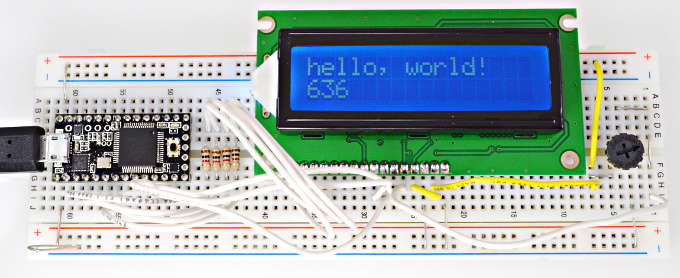 Connect D4-D7 with 1K resistors for 3.3V Teensy & LiquidCrystalFast |
Details
For more details, please refer to the official LiquidCrystal page.LiquidCrystalFast was written by John Raines in 2010. The Arduino developers had planned to include it into Arduino 0019, but appear to have abandoned plans to use John's improvements.
Custom Character Creator by Druno Maia
LiquidCrystal can use 8 all data pins. However, careful benchmarking with found little speed advantage. With R/W used by LiquidCrystalFast (which does offer nearly a 4X speedup with most LCDs), 8 pins is actually slower due to the Arduino pin number conversion done to switch the extra 4 pins from input to output.
LiquidCrystal offers an option to use the R/W pin, but internally the code never makes use of that pin. If merely drives that pin low. If you want the R/W speedup, only LiquidCrystalFast actually makes use of the R/W pin.
Another new LCD library also aims to improve upon LiquidCrystal.