

Teensyduino, Version 1.62
Arduino 2.x.x Software Development (Install by Boards Manager)
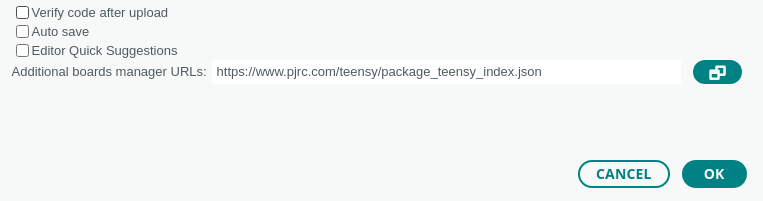
First download the Arduino 2.x.x IDE from Arduino's website. All versions 2.0.4 and later are supported. Versions 2.3.10 or later is recommended, due to improvements recompile speed.To install Teensy on Arduino IDE 2.x, click File > Preferences (on MacOS, click Arduino IDE > Settings). On Windows 11 laptops a with small touchscreen display, you may need to scroll down to even if no scrollbar appears. In "Additional boards manager URLs", copy this link:
https://www.pjrc.com/teensy/package_teensy_index.json
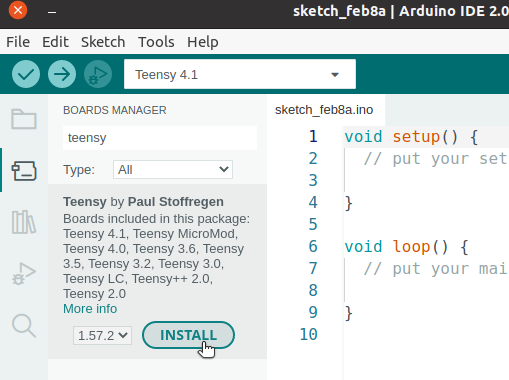
In the main Arduino window, open Boards Manager by clicking the left-side board icon, search for "teensy", and click "Install".
Stand Alone Files
- Teensy Loader - Load already-compiled .HEX or .EHEX onto your Teensy
- Linux udev rules - Proper setup for USB devices on Linux systems
- Windows Serial Installer - For USB Serial access on old Windows XP, Vista, 7, 8.
Arduino 1.8.x Software Development (Download and Run Installer)
Teensyduino is a software add-on for the Arduino software.
- Linux Installer (X86 64 bit)
- Linux Installer (ARM 32 bit / Raspberry Pi)
- Linux Installer (ARM 64 bit / AARCH64 / Jetson TX2)
- Windows XP / 7 / 8 / 10 / 11 Installer
Teensyduino 1.62 supports Arduino versions 1.8.5 and 1.8.9 and 1.8.13 and 1.8.15 and 1.8.16 and 1.8.19.
Arduino 2.0.4 and later are supported by use of Arduino Boards Manager.
On Windows, the Arduino installer and ZIP are supported, but the Windows store "app" is not.
Windows 10 & 11 provide much better USB support than Windows 7, 8 & XP.
On Linux, PJRC tests X86 & AARCH64 on Ubuntu and ARM32 on Raspbian. Other distros may work, but are not supported.
Support for Arduino IDE 1.8.x on MacOS has been discontinued. Only new Arduino IDE 2.x.x is supported on MacOS.
Windows Installation
- Download and run Arduino's Windows Installer, for Windows 7 and up.
Note: The Arduino "Windows app" from the Microsoft Store is incompatible with Teensyduino. - Download and run the Teensyduino installer.
- (optional) Check for anti-virus performance problems.
Macintosh Installation
- Download Teensyduino "Macintosh Complete Software".
Note: This download is a complete copy of all software. No separate installer is used.
- On first use, you must allow access to your Documents folder.
- (optional) If using multiple monitors, uninstall old Java if the software crashes.
Linux Installation
- Download the Linux udev rules (link at the top of this page) and copy the file to /etc/udev/rules.d.
sudo cp 00-teensy.rules /etc/udev/rules.d/
- Download and extract one of Arduino's Linux packages.
Note: Arduino from Linux distro packages is not supported. - Download the corresponding Teensyduino installer.
- Run the installer by adding execute permission and then execute it.
chmod 755 TeensyduinoInstall.linux64
./TeensyduinoInstall.linux64
Windows Non-Admin Installation
- Download Arduino's Windows ZIP file for non admin install.
- Extract the ZIP file, and remember the extracted location.
- Download the Teensyduino installer. Save the file, do not run.
- Rename TeensyduinoInstall.exe to Teensyduino.exe.
Note: Removing "Install" from the name causes Windows to treat the installer differently!
- Run the renamed Teensyduino installer. You will need to select the extracted Arduino location.
- (optional) Check for anti-virus performance problems.
Old Macintosh Installation
- Download Arduino 1.8.5 from Arduino's Previous IDE Releases Page.
- Move Arduino to Applications.
- Run Arduino and confirm running software downloaded from the internet.
Note: This must be done before installing Teensyduino, to avoid a corrupted install.
- Download and run the Teensyduino Installer. It only works on MacOS versions 10.7 to 10.14.
Teensyduino History
Version 1.59
C++17 used for Teensy 3.x and 4.xEnable LTO options in Arduino Tools > Optimization menu
Fix startup for LTO optimization
Remove serialEvent_default, refactor yield_active_check_flags
Add inplace_function for callbacks
IntervalTimer use inplace_function
IntervalTimer demo callback backwards compatibility
Delete unused flags from String
Use C++17 to simplify IntervalTimer (Luni)
Fault handler use main vs process stack pointer (Christian Kahlo)
USBHost_t36 update DriveInfo example (Warren Watson)
FastLED fix C++17 compiler warnings
Tlc5940 update documentation, SCLK overshoot sensitivity
Fix const init on Wire, SPI, HardwareSerial
Update FlexIO_t4 - ??? (KurtE)
define SPI_HAS_NOTUSINGINTERRUPT
define WIRE_INTERFACES_COUNT and SPI_INTERFACES_COUNT
make availableForWrite virtual (Shawn Silverman)
remove old abs() and round() (mjs513)
CrashReport breadcrumbs improved
update example Makefile
fix Lockable Teensy auto-reboot with optimize smallest size with LTO
fix USB Touchscreen on Teensy 4.x with Windows
extmem_calloc() clears memory (Shawn Silverman)
add Print::vprintf() (Randy Palamar)
Audio improve AudioEffectWaveshaper initialization
Update ILI9488_t3 - ???
Update Keypad - Allow time for signals to settle
Update LittleFS - Add support for GigaDevice NOR Flash
Update RA8875 - ???
Update ST7735_t3 - ???
USBHost_t36 improve timers, fixes simultaneous transmit to 3+ devices
USBHost_t36 fix MIDI fast sustained receive
USBHost_t36 HID parser changes??? (KurtE)
USBHost_t36 RawHID improvements (KurtE)
USBHost_t36 Serial example update (KurtE)
teensy_secure add encrypthex_unlocksnvs option
Teensy monitor on Windows avoid 0 baud setting - not yet in IDE2 packages
Publish Arduino IDE 2.x.x packages using zstd compression
SD/SdFat Workaround for old version 1 cards with SDIO on Teensy 4.1
SD/SdFat Handle cards which falsely claim high speed support (tompilot)
FlexIO_t4 add setClock(), setClockUsingAudioPLL(), setClockUsingVideoPLL()
FlexIO_t4 fix minor issues and update examples
HardwareSerial base class
SoftwareSerial fix for MicroMod (KurtE)
SPI fix constinit for Teensy 3.x
Don't allow writing to ITCM after startup on Teensy 4.x
Update Stream parseInt and parseFloat for LookaheadMode
USB MIDI add realtime send functions (same API as MIDI library)
Add alternate names for FlexIO register bit fields
Fix Serial2 on MicroMod (KurtE)
Fix vprintf on Teensy 2.0
Fix pulldown on half duplex serial (KurtE)
Use namespace "teensy" for inplace_function
IPAddress compare operators are const (ssilverman)
ILI9431 fix DemoSauce example
ILI9488_t3 for clearChangedRange() on Teensy 3.2 (mjs513)
LittleFS fix wrote info in example (karelv)
USBHost_t36 fix race condition in MIDI read()
USBHost_t36 fix sustained fast MIDI receive
USBHost_t36 improve USBDriverTimer to fix fast transmit to 3+ USB devices
USBHost_t36 fix USBHIDDumper example (KurtE)
USBHost_t36 fix typos and spelling mistakes in comments (KurtE)
USBHost_t36 update virtual function defs (pr8x)
Show warning if IDE 2.x.x package used on IDE 1.8.x
analogRead() disable pin input keeper on Teensy 4.x
attachInterrupt always turn on pin hystersis on Teensy 4.x
Add DSB before return from interrupts from attachInterrupt
Wire: Scanner example scans all ports
Wire: Use WIRE_INTERFACES_COUNT for instances on Teensy 3.x
Add SEMC bitfield defines
Add MPU config for SEMC needed by SDRAM_t4 library
SdFat: Fix compiler warning with LTO linking on Teensy 4.x
SdFat: Removed a couple extraneous printfs (mjs513)
Fix makeWord() return type
Fix compiler warning with LTO on Teensy 3.x
LittleFS: Fix compiler warning with LTO linker
Close Teensy Loader on Arduino IDE 2.2.2 Boards Manager uninstall
Fix for wrong Teensy auto-reboot during upload
USB Serial emulation availableForWrite()
Add LCDIF defines (A-Dunstan)
Remove unused IntervalTimer code (Luni)
Audio fix CS4274 (WeTac)
Snooze fix on Teensy 4.x (BriComp)
Fix unable to auto-reboot on Linux
Fix for launching Teensy Loader on MacOS Sonoma from Arduino 1.8.19
Version 1.58
Updated toolchain to gcc 11.3.1 for Teensy LC, 3.x, 4.xUpdate core library for gcc 11.3.1
Update Wire library for gcc 11.3.1
Update teensy_size for gcc 11.3.1
FlexIO_t4 FlexSerial support more baud rates (KurtE)
AudioEffectEnvelope fix release name conflict (Jonathan Oakley)
Add audio DynamicPatching example (Jonathan Oakley)
Audio design tool fix control name on export (Jonathan Oakley)
USBHost_t36 improved HID device diagnostic info (KurtE)
Improve C & C++ library access to Teensy 3 & 4 RTC hardware
Audio use IntervalTimer for updates if no hardware update available
automatically create .lst file after linking
include time.h with Arduino.h
fix FNET on gcc 11
update MFRC522
fix Snooze errors with gcc 11
update TeensyThreads
USBHost_t36 bluetooth and HID improvements (KurtE)
New gcc 11.3.1 toolchain supported on all systems
Fix compiler warnings, many libraries
Fix missing serial receive with Arduino 2.0.x on Windows after Teensy reboots
Fix unable to start Teensy Loader on MacOS Ventura with Arduino 1.8.x
fix USB MIDI transmit on Teensy 4.x when running at only 12 Mbit/sec speed
Arduino 2.0.x "Invalid FQBN" workaround
Print warning message is "serial port" not "teensy port" selected
Fix Teensy Loader startup problem on Raspberry Pi 4 running Raspbian Buster
FlexIO / FlexSerial improvements (KurtE)
USBHost_t36 - update storage examples (KurtE)
ST7735_t3 - fix screen width check (KurtE)
C++11 move semantics on File (ScottDuckworth)
MTP.loop() would wait 1ms with no messages (KurtE)
Allow unconnected AudioConnection (Jonathan Oakley)
Fix Serial1.availableForWrite() on Teensy 2.0
AudioSynthWavetable fixes & docs (Jonathan Oakley)
USBHost_t36 Bluetooth improvements (KurtE and mjs513)
Improve String support for 64 bit integers
Allow programs to override gettimeofday (Shawn Silverman)
Improve bare (without Serial, Serial1, File) printf() support
Handle null pointer gracefully in Serial.write(string)
Fix Serial.write() return value (Shawn Silverman)
Fix IntervalTimer end() when timer interrupt pending
Speed up HardwareSerial FIFO size calculation (Shawn Silverman)
Fix startup with -Os and -Og optimization
Allow programs to override sbrk (Timo Sandmann)
Stream String readStringUntil() default to allow unlimited length
Define WIRE_INTERFACES_COUNT for Arduino compatibility
Fix TIMSEL field width in FlexIO SHIFTCTL register (squidcc)
Allow SdVolume to access card, but with deprecated warning
Fix compiler warnings with -Wextra (Shawn Silverman)
Change Print::write_error for Arduino compatibility (Shawn Silverman)
Call yield() from second/third USB serial bool (Geert Uytterhoeven)
Audio design tool fix import with AudioEffectDelayExternal (Jonathan Oakley)
Audio design tool import space objects for better visibility (Jonathan Oakley)
Audio tutorial examples updated for Teensy 4.0
Aduio examples updated with comments for Teensy 4 hardware
USBHost_t36 fix compiler warnings
USBHost_t36 improve startup on USB disks (Warren Watson)
USBHost_t36 fix USB disks endpoint issue (jmarsh)
USBHost_t36 fix Ant+ infinite loop (Gbertaz)
USBHost_t36 fix compiler warning (Jonathan Oakley)
USBHost_t36 support more Xbox One controllers (Dave Madison)
USBHost_t36 support CP2105 USB serial (jammerx19)
ILI9488_t3 support multiple displays (mjs513)
ILI9488_t3 update Digitizer4 example (KurtE)
LittleFS fix FRAM on alternate SPI ports (mjs513)
RA8875 fix fft_example2 example
WS2812Serial Remove 400 Hz refresh rate limit
XPT2046_Touchscreen further document alternate SPI ports
Linux warning if 00-teensy.rules missing
Fix SdVolume compatibility on Teensy 2.0
USBHost_t36 more cautious date transfer queuing (KurtE)
Version 1.57
Article with high-level summary of new features in Teensyduino 1.57USBHost_t36 USBDrive & USBFilesystem (wwatson,KurtE,mjs513)
SdFat update to 2.1.2, fixes file append bug
Wire library support slave mode on Teensy 4
Workaround MacOS serial monitor crash
Add breadcrumb feature to CrashReport
Improve AudioInputAnalog on Teensy 4
Add AudioOutputPWM on Teensy 4 (Mark Tillotson)
Tlc5940 support for Teensy 4
Update ADC library
EEPROM fix get() & put() with String (Luni64)
Ethernet allow use of other SPI ports (KurtE)
SdFat FsVolume::begin allows explicit partition location
SdFat support FAT12 & single FAT on Circuit Python (KurtE)
SdFat volume name functons (KurtE)
SD fix listfiles example on Teensy LC
SD update SdFat_Usage example with other SPI ports
SD add setMediaDetectPin() for card detection (KurtE)
Increased use of yield() in blocking functions
IPAddress != operator (Shawn Silverman)
Dynamic AudioConnection on Teensy 4 (Jonathan Oakley)
MTP handle host cancel & status control transfer
LittleFS getMediaName (mjs513)
LittleFS support 255 char filenames
OctoWS2811 getPixel() supports RGBW (Tobias Johansson)
QuadEncoder fix home and index trigger (mjs513)
QuadEncoder setCompareValue() (mjs513)
boards.txt & platform.txt updated for Arduino 2.0 beta
Add pluggable discovery & monitor for Arduino 2.0 beta
Add USB Type Serial+MTP
Dynamic AudioConnection on Teensy 3 (Jonathan Oakley)
Fix RawHID revc with 0 timeout on Teensy 4 (KurtE)
Fix PT8211_2 initialization (KurtE)
Update QuadEncoder (mjs513)
USBHost_t36 USBDrive handle GPT & Ext partitions (KurtE)
USBHost_t36 USBFilesystem formatting (mjs513, KurtE)
USBHost_t36 USBDrive startFilesystems (KurtE)
Remove SdFat GPT & Ext partitions, now done in USBHost_t36
Improve Wire slave mode on Teensy 4
Fix for Arduino CLI & IDE 2.0 packages messing up Teensy on Arduino 1.8.x.
Support headless compile (but not yet upload) on Arduino CLI
Add Serial+MTP USB Type
Add function descriptions for Arduino IDE 2.0.0-rc7
SD, Ethernet, LiquidCrystal override Arduino 2.0.0-rc7 builtin libs (KurtE, PerT)
Audio TDM examples
Audio S/PDIF fixes on Teensy 4 (Jonathan Oakley)
Add signatures to utilities on Windows
Update Lockable Teensy to support newest hardware
Add pluggable discovery USB Type menu setting
Fix SD usedSize totalSize after media removal (Kurt E, mjs513)
Fix USBHost filesystem date / time functions (Kurt E)
USBHost_t3 support dual port FTDI USB-Serial (Kurt E)
Fix serial monitor transit with Arduino IDE 2.0 on Windows
Reformat I2S register defines (Kurt E)
Add signature to teensy_secure.exe on Windows
Fix bug affecting oldest (maybe beta) Lockable Teens
Similar startup delay code between Teensy 3 and 4
Version 1.56
Support for Arduino 1.8.19Fix serial monitor stall on Windows
Fix upload failure to locked Teensy 4 if button pressed
FS.h support file create and modify time
SD support file create and modify time
SD automatically uses RTC
LittleFS support file create and modify time
LittleFS automatically uses RTC
Add makeTime, breakTime, DateTimeFields
Fix serial monitor regression with MTP on Linux
Fix digitalPinHasPWM for higher pin numbers on Teensy 4
MTP configure event endpoint on Teensy 4
Add FS format() and mediaPresent()
Add String compatibility to FS,SD,LittleFS,etc
Add LittleFS format() (mjs513)
Add SD format() and mediaPresent()
Update SdFat to version 2.1.0 and enable UTF8 filenames
Edit SdFat examples to compile on Teensy 3 & 4
Audio fix PT8211 when no audio data input (Frank B)
Audio i2s2 slave mode (alex6679)
Update FastCRC (Frank B)
USBHost_t36 HID support 1000 Hz update (Kurt E)
USBHost_t36 Keyboard forward API and example (Kurt E)
Reduce wasted memory during linking (Frank B)
Fix MTP detection on Linux
Fix serial monitor on Linux with MTP
Fix rare serial monitor stall on Windows
Fix rare Null Pointer Exception when closing serial monitor
Teensy Loader updates Teensy 4.0, 4.1, MicroMod to bootloader 1.07
Improve SD.mediaPresent()
Fix SD compile error on Teensy LC
Show helpful error if original SdFat used
Fix SdFat example compile errors, FsFile & SD_FAT_TYPE
Delete SdFat examples not needed for Teensy
Improve SdFat format speed with SHARED_SPI
Improve SdFat free cluster count speed with SHARED_SPI
Add SdFat restart(), to reinitialize hardware & card
SdFat FAT16/32 format use existing buffer (Kurt E)
SdFat support for GPT partitions (Kurt E)
SdFat fix use of USE_SIMPLE_LITTLE_ENDIAN
SdFat fix exfat corruption when using timestamps (Kurt E)
Wire use inline functions for AVR
Wire increase buffer size on Teensy 3 & 4
Wire fix ambiguous requestFrom with bool
FS use block write (Kurt E)
Fix IMXRT_DMA_TCD define
Add comments in imxrt.h for clock gate requirements
Fix MTP count of bytes transferred (Kurt E)
Improve usbMIDI.send_now() on Teensy 3.x (Robert Jonkman)
Improve Stream comptibility with newer Arduino (Kurt E)
Audio add play queue setMaxBuffers() (Mark T)
Audio add play queue play() for raw data (Mark T)
Update FastLED to 3.4
FastLED fix OctoWS2811 driver on Teensy 4 (Shawn Silverman)
FastLED fix WS2812B timing on Teensy 4
OctoWS2811 add BasicTest_FastLED example
FreqCount fix for reading less slower than gate interval (mjs513)
FreqCount add missing end() function (mjs513)
LittleFS update internal littlefs to version 2.4.1 (mjs513)
Tlc5940 minor update for compiler flag setting (Adam Phelps)
OneWire minor updates for non-Teensy boards
USBHost_t36 fix HIDDumper example for Linux (Kurt E)
USBHost_t36 increase enum buffer for complex MIDI devices (Robert Jonkman)
Improve Teensy 4 Secure fusewrite and locksecuremode
Allow some old Teensy 4.x boards to run EHEX files
Add usage info with -h to teensy_post_compile and teensy_ports
Fix teensy_ports -L on Windows
Support for Arduino 1.8.18
SD faster detection of SDIO media change (KurtE)
SdFat fix SDIO on MicroMod (mjs513)
Fix pins 38 & 39 on MicroMod
LittleFS improve erase+write speed for NOR flash chips
LittleFS fix FRAM defines
LittleFS add Write_Speed_Test example
Fix PXP_PS_CTRL register defines
Fix USB receive packet loss with MTP on Teensy 4
Audio fixes for very small buffer size (Eric Fontaine)
FreqCount fix 1st reading on Teensy 4 (mjs513)
Teensy Loader verbose info clearer Standard vs Lockable
Drop Arduino 1.8.18
SdFat use same SDIO signal strength on all Teensy 4 (mjs513)
More MicroMod & Teensy 4 pin 38 & 39 fixes
Fix AudioPlayQueue internal stall (h4yn0nnym0u5e)
Add AudioControlCS42448 functions (modularev)
AudioInputAnalog compile on Teensy LC
Update FlexCAN_T4
Fix ILI9488_t3 examples (KurtE)
Update IRremote
LittleFS add LittleFS_SPI & LittleFS_QSPI wrappers (KurtE)
Fix LittleFS examples (mjs513)
Remove unneed LittleFS RAM cache flush (Defragster)
Fix OctoWS2811 VideoDisplay_Teensy4 extra cases (timethy96)
RA8875 examples fixed (KurtE)
RadioHead examples fixed (mjs513)
RadioHead fixes for Teensy 2
Snooze examples fixed (KurtE)
ST7789_t3 examples fixed (KurtE)
TeensyThreads updated
TFT_ILI9163C examples fixed
XPT2046_Touchscreen threshold adjusted (Andrew Kroll)
Fix SD example SdFat_Usage on Teensy 2.0
Fix SdFat example BackwardCompatibility on Teensy 2.0
SoftwareSerial add bool operator
Fix SD src-utility conflict when installed on top of 1.53 with Arduino 1.8.5-1.8.9
Audio fix compiler errors & warnings with Teensy LC
Audio Fix MidiSynthKeyboard example on Teensy 4
Audio async spdif example to compile on all boards
ILI9488_t3 fix compile errors in examples (KurtE)
ILI9488_t3 better document examples (mjs513)
LittleFS fix RAM Test_Integrity on Teensy 3.5 & 3.6 (Defragster)
LittleFS add Cypress and Fuji 2MBit FRAM support (KurtE)
MIDI fix DualMerger example
Fix Snooze hibernate/sd_datalogger example
SD & LittleFS listfiles PrintTime check valid month
Fix Print::printf to call va_end (Shawn Silverman)
SD getModifyTime getCreateTime check 0 from SdFat (KurtE)
Version 1.55
Support for Lockable Teensy 4.0 (beta)kinetis.h comments added for required clock gate config on each peripheral
Fix higher temperature measure on Teensy 4.x (mjs513)
Fix USB serial transmit autoflush race condition on Teensy 4.x (thanks Frank B)
Add IMXRT fuse memory functions
NXPMotionSense add Quaternion access (Ryan Pearl)
USBHost_t36 bluetooth PS4 improvements (KurtE)
USBHost_t36 serial DTR & RTS support (KurtE)
USBHost_t36 serialemu fixes (Frank B)
Update NativeEthernet & FNET
Support for Arduino 1.8.16
Remove Arduino 1.8.14
Fix teensy_size crash with very large programs (Frank B)
Lockable Teensy support on MacOS
Fix Windows 7 communication with locked chips
File base class changed to File & FileImpl
Update SD & LittleFS for FileImpl class
Preliminary work for unusable locked chip to not stall Teensy Loader
Fix startup crash when compiled with gcc version 10 (Frank B)
Fix LittleFS_Program size (mjs513)
Improve LittleFS examples & readme (mjs513)
SdFat use MAINTAIN_FREE_CLUSTER_COUNT on 32 bit Teensy
Do not build .lst file - very slow for large code
Sketch > Export Compiled Binary now saves .ehex, if possible
Consistent startup sequence on Teensy 3 & 4
Add startup_default_middle_hook()
Fix Serial.begin() delay with serial emulation and Teensy 3
String compatibility with Arduino for C++ iterators
Fix DMAChannel triggerContinuously() on Teensy 4 (Kurt E)
Fix CCM_ANALOG_PLL_ENET define (Shawn Silverman)
Improve arm_dcache_delete() documentation
Rename LittleFS example folders
LittleFS_RAM always starts blank
Update ST7735_t3
Update TeensyThreads
Fix Teensy Loader GUI stalls with locked Teensy 4
Show .ehex filename in status bar when automatically using .ehex
Clearer messages about hex vs ehex in Verbose Info
Only show percentage flash used after connecting to real hardware
Avoid fusewrite fuse memory corruption if different key used
Improve error messages in fusewrite sketch
Consistent pin numbers in LittleFS & SD examples
Reorder MTP & HID interfaces (Kurt E)
Add LittleFS keywords (mjs513)
Version 1.54
Blog article with more readable explanation of major 1.54 changes.Support for MicroMod
Fix SPI with DMA to cached memory on Teensy 4.x
Support alternate Wire3 pins on Teensy 4.1
Improve map() function
Show Serial.printf format warnings
Fixes for HAB secure boot
Update imxrt.h comments for RT1060 Reference Manual, Rev 2
AsyncAudioInputSPDIF3 bugs fixed
synth_tonesweep update?
NativeEthernet & FNET update
Update ILI9341_t3
Update QuadEncoder
Update RadioHead
Update ST7735_t3
Update USBHost_t36
XPT2046_Touchscreen
Wait up to 6.2 seconds for Teensy to reboot (was 5 seconds)
Fix 1.54-beta1 startup problem on Teensy 4.1
EEPROM put/get handle String and warn for incompatible classes (luni64)
Add _extram_start & _extram_end for Teensy 4.1
Update Bounce2
Add File base class and FS.h header
Add SdFat-beta library
Replace SD library with wrapper which uses SdFat
SoftwareSerial improvements on Teensy 3.5, 3.6, 4.1
Update NativeEthernet
Audio: Improve simultaneous WAV playing & add SimultaneousPlay test
SD default to 16 MHz SPI clock
Serial Monitor fix double spaced lines copied to clipboard
Serial Monitor avoid auto horizontal scroll on very long lines
Serial Monitor fix memory leak on MacOS
File & FS classes improved - many changes!
Add LittleFS library - lots of new stuff here...
FS open() supports FILE_WRITE_BEGIN mode
SdFat-beta renamed to SdFat
Add delayNanoseconds() on Teensy 2.0, LC, 3.x
Print class support for 64 bit integers
DMAChannel attachInterrupt(isr, priority) (WMXZ)
Update NativeEthernet
SD listfiles example improved
Fix Audio PT8211 issue on Teensy 4.x
Improve Audio simultaneous WAV playing
Fix USB issue for MTP to run at 600 MHz
Fix double space on copy from serial monitor on Windows
Configurable MIDIx16 port names (vjmuzik)
Support for no USB (vjmuzik)
Fix multiple def with EEPROM put() & get()
Update FlexCAN_t4
Update NativeEthernet
Update RadioHead
Update ST7735_t3
Update SdFat to 2.0.5.beta1
Wire lib Scanner example updated
Audio waveform synth add bandwidth limited waveforms (Mark Tillotson)
Fix audio design tool conflict with DAC & PWM outputs (manicken)
Fix audio compile errors with Teensy LC (Frank B)
Add I2S output for Teensy LC (Frank B)
Add PT8211 output for Teensy LC (Frank B)
Add support for SGTL5000 in I2S master mode
Fix bug in SGTL5000 BiQaud filter calculation (Graham Whaley)
Fix minor bug in S/PDIF resampling (alex6679)
Add Play/Pause function to WAV player (standarddeviant)
Fix waveform synth discontinuities in phase modulation (Mark Tillotson)
Fix buzzing noise in FreeVerb due to numerical truncation (matt venn)
SGTL5000 support for switching headphones to input signal (Jurgen Beliën)
Add JavaScript version of wav2sketch (Matt Bradshaw)
Add LittleFS NAND & FRAM support (MJS513)
Add LittleFS LFSintegrity test program (Defragster)
Add OctoWS2811 RGBW LED support
Add OctoWS2811 VideoDisplay example for Teensy 4.x
USBHost_t36 add MassStorageDriver work-in-progress (wwatson)
USBHost_t36 Serial driver support for Teensy seremu (KurtE)
Update WS2812Serial for extra Teensy 4.1 pins
Improve serial emulation for non-serial USB types
Windows digital signature changed - old cert expired
Improved memory usage info for Teensy 4.0 & 4.1
Audio input PDM on Teensy 4.x (Mark T)
Audio ladder filter (Richard van Hoesel)
Audio fixes on Teensy LC (Frank B)
USBHost_t36 improve MIDI transmit speed
Fix Teensy Loader slow startup on Ubuntu 20.04
Update Linux udev rules - NOTE: filename changed!
Fix Teensy Loader excessive CPU use on Linux
SD typecast to SdFat reference, for libs like MD_MIDIFile
SdFat fix corrupted filename from getName()
Wire Scanner update known chips
Wire initializion code in flash memory only (Frank B)
Fix USB audio volume range (Frank B)
Improve individual audio object CPU usage info
Fix EEPROM on Teensy 4.x when compiled with -Os (Frank B)
Fix Arduino IDE Java IOException on quit
Support for Arduino 1.8.14
Fix MPU settings, solve mystery 1.7 sec stalls (FrankB)
Fix Ethernet W5100 on Teensy 4.0 running at > 150 MHz
Wire library names updated for MicroMod (mjs513)
Add Kurt's FlexIO_t4 library (KurtE)
Add missing FlexIO defs to imxrt.h
Fix IMXRT_GPIO_t ISR name on Teensy 4
Serial.begin() to wait up to 2 seconds for serial monitor
Audio add WaveFolder (Mark T)
Audio fix double promotion warnings (FrankB)
Audio improve ladder filter (Richard van Hoesel)
LittleFS updates to lowLevelFormat (Defragster, KurtE)
RA8875 updates
ST7735_t3 updates
USBHost_t36 update mass storage
USBHost_t36 undo zero interrupt latency change, breaks some drivers
Fix memory usage on MicroMod
Show ITCM actual memory usage & padding
Support for Arduino 1.8.15
Fix FreqMeasureMulti on Teensy 4 (joepasquariello)
Fix USB buffer bug on Teensy 3, remove old workaround (ryanrs)
Fix mempy crossing memory regions on Teensy 3.x
Fix EEPROM compile issue on Teensy 2.0
Align code & non-code boundaries to 1K on Teensy 4.x
Fix startup bug on Teensy 4
Fix emulated EEPROM corruption bug on Teensy LC
Fix typo in Audio TDM input documentation
Update FlexIO_t4 (from KurtE)
LittleFS persist ramdisk (Defragster)
Fault handler on Teensy 4 stores info, keeps USB active, reboots after 8 sec
Add CrashReport for printing or logging fault info
Fix NULL pointer read after String subString returning empty
Fix String operator == ambiguous overload
Disable Arduino Sketch-Upload Using Programmer menu item
LittleFS minor updates (mjs513)
Update NativeEthernet
Add cmsis_gcc.h, for Arduino_TensorFlowLite library
Fix Serial2 vs Serial4 on MicroMod (KurtE)
Add SD library SdFat_Usage example
Reduce CrashReport memory usage
_VectorsRam change to volatile
Updated Linux udev rules
CrashReport placehold for Teensy 2.0, LC, 3.x
LittleFS Integrity exmaples cleanup (Defragster)
Fix TEMPMON register defs (ssilverman)
Delete wav2sketch.exe - triggers anti-virus false positives
Fix Audio compile error on Teensy LC
Improve USBhost_t36 examples arrangement
Version 1.53
Support for Arduino 1.8.13Reduce EventResponder and yield() overhead (KurtE)
Audio design tool checks I/O compatibility (thanks to Frank's JavaScript work)
Update audio design tool documentation
Speed up ILI9341_t3 and add setClock (Larry Bank)
USBHost_t36 add Keyboard attachRawPress & attachRawRelease (David "plugz")
Fix DmxSimple on Teensy 4.0 (Adam Demuri)
add pgmspace.h (not avr folder) compatability for Teensy 4.0
minor updates to SD and Wire examples
Improve C++ STL support
Fix compiler warnings in several library examples
Update libraries: FastLED, MIDI, RA8875, Adafruit_NeoPixel, FlexCAN, FlexCAN_T4, ILI9488_t3
Entropy library support for Teensy 4.x random number hardware
ILI9341_t3 proportional font rendering speedup (Larry Bank)
Audio: add rectifier effect and vocoder example by Bradley Sanders
Fix serialEventUSB1 & serialEventUSB2 on Teensy 4.x (KurtE)
Add MIDIUSB.h compatibility on Teensy 4.x
Check hardware serial FIFO in avalable and peek (KurtE)
Remove libraries: Adafruit_GFX, Adafruit_CC3000, Adafruit_RA8875, openGLCD, ST7565
Add SPI.end() on Teensy 4.x (KurtE)
Fix PT8211 output on Teensy 4.x
Fix USB BDT clear at startup on Teensy 3.x (Memotech-Bill)
Add digitalToggle(pin)
Fix numerical overflow in Audio CPU usage on Teensy 4.x
Remane addStorage to addMemory
Add Teensy 3.5/3.6 hardware random to Entropy (Manitou)
Fix ILI9341_r4 readcommand() & add readScanLine() on Teensy 4.x
Installer will delete old/stale libraries
Linux installer checks udev rules
Libraries updated: ADC, ILI9488_t3, RA8875
Fix audio library on Teensy LC
Fix ST7735_t3 spitftbitmap example (KurtE)
Version 1.52
Support for Teensy 4.1USB Audio support for Teensy 4.0
OctoWS2811 ported to Teensy 4.0
WS2812Serial support for RGBW SK6812 LEDs
FreqMeasureMulti ported to Teensy 4.0 (KurtE)
Dual & Triple USB Serial (Geert Uytterhoeven)
Audio support for 4,6,8 channel I2S on Teensy 4.0
Audio support for SPDIF input on Teensy 4.0 (FrankB)
Audio DAC support for Teensy LC (Ben Kurtz)
Fix Serial.print() conflict with USB Touchscreen
Fix contact count on USB Touchscreen (purple-ben)
Defined FLASHMEM on Teensy 3.x, for compatibility with Teensy 4 code (FrankB)
Fix cache handling in I2S audio input on Teensy 4.0 (Frank B)
Fix numerous iMXRT register field defines
MTP USB descriptors on Teensy 4.0 - actual MTP support still experimental
Libraries updated: FlexCAN_t4, ST7735_t3, RA8875
Fix USB RawHID on Teensy 4.0 (KurtE)
Fix USB audio+midi+serial descriptor on Teensy 4.0 (widdly)
Add ADK to USBHost_t36 (Matt Bergman)
Fix USB Host MIDI transmit race condition (essej)
Optimize USB interrupt on Teensy 4.0 (Frank B)
Arduino compatibility of digitalWrite control pullups (FrankB)
Add missing MPU traps on Teensy 4.0 (FrankB)
Fix SGTL5000 clock ratio setting (FrankB)
Fix I2S slave on Teensy 4.0 (widdly)
Add DMAMEM & fix warnings in I2S on Teensy 4.0 (FrankB)
Improve SPI use by SD on Teensy LC (rutmarti)
Support alternate SPI pins on Teensy 4.1 (KurtE)
Support alternate Teensy 4.1 CS pins on ILI9341_t3 (KurtE)
Fix Teensy Loader on MacOS 10.13 with Catalina version
Fix teensy_serialmon 100% CPU on Linux if Arduino process killed
Workaround for rare Windows Defender flase positive when installing Java classes
Allow SD.begin() to be called more than once
Support hardware serial CTS pins on Teensy 4.1 (KurtE)
Fix double float promotion (Frank B)
Fix I2S input use of cache (Frank B)
Fix installer crash on Jetson Nano
Update libs: RA8875, ILI9844_t3, QuadEncoder, ST7735_t3
Fix RTC auto-set on Teensy 4.x with daylight savings time
Fix RTC set on Teensy 4.0 (Silverlock)
Audio ADC input on Teensy 4.0 - experimental
Hardware serial pin fixes for Teensy 4.1 (KurtE)
Add dummy Keyboard.h on Teensy 4, for Arduino compatibility
Use standard (not low power) ADC mode
Align DMA buffers to 32 bytes (Frank B)
Fix ADC_ETC defines
Use recommended analog bias current on Teensy 4.x (Frank B)
Update Snooze library
Fix Audio ADC input on Teensy 3.x
Initialize PSRAM chips at startup on Teensy 4.1
Increase PSRAM clock to 88 MHz & fix error in writing clock setting
Use strong drive & hysteresis for FlexSPI2 pins
Minor improvement in OctoWS2811 for Teensy 4.x
Workaround for USB memory bandwidth at very slow CPU speeds
Clean up compiler warnings in USBHost_t36 ADK driver
Fix import bug in Audio Design Tool (Frank B)
OctoWS2811 support for any group of pins on Teensy 4.x
OctoWS2811 fix memory use with fewer than 8 pins
Version 1.51
Support for Arduino 1.8.12Add USB Flight Sim for Teensy 4.0 (Jorg Neves Bliesener)
fix panic temperature power off on Teensy 4.0 (FrankB)
SerialFlash support AT25SF128A (FrankB)
Wire lib minor updates
Fix analog comparator IRQ names (sgorsh)
Limit shiftOut to 10 MHz (FrankB)
Version 1.50
Support for Arduino 1.8.11Fix soft reboot on Teensy 4.0
Fix 1 GHz in Tools > CPU Speed
Fix IntervalTimer minimum on Teensy 4.0 (KurtE)
Add defines for ethernet and PLLs
Add defines ARDUINO_TEENSY## for each board
Fix Printable.h with WiFiNANA lib on Teensy 4.0 (MichaelMeissner)
Minor fix to defines (Frank B)
Update ADC & ST7735_t3 libraries
Version 1.49
Support for MacOS CatalinaOptimize USB serial on Teensy 4.0
Add Teensy 4.0 USB MIDI, Keyboard, Mouse, Joystick
Port WS2812Serial to Teensy 4.0 (KurtE)
Move USB serial buffers from ITCM to OCRAM on Teensy 4.0
Fix stalled USB serial transmit if multiple of 64 bytes on Teensy 4.0
Support different USB descriptors for 12 vs 480 speed on Teensy 4.0
Add FLASHMEM keyword
Arduino memory usage for Teensy 4.0 shows only RAM1 (512K) bank usage
Fix Audio lib delay effect maximum (2.4 sec) on Teensy 4.0
Fix missing ITCM padding from Teensy 4.0 memory usage
Fix empty code on Teensy 3.x if yield() overridden and no core lib functions used
Reduce DTCM memory usage by USB descriptors on Teensy 4.0
Fix USB transfer complete callbacks on Teensy 4.0
Fix Audio lib memory limit on Teensy 4.0
WS2812Serial add functions for better compatibility with Adafruit_NeoPixel
Windows teensy_serialmon (hopefully) doesn't lock up (but still too much buffering!)
AVR register emulation on Teensy 4.0 (KurtE)
Fix serial DMA def on Teensy 4.0 (KurtE)
Improve ADC & XBAR defs on Teensy 4.0 (KurtE)
Improve quadrature encoder defs on Teensy 4.0 (mjs513)
Add Teensy 4.0 USB Touchscreen, not finished... work in progress
Remove serial monitor debug messages on Arduino 1.8.9
Fix delay() and micros() on Teensy 4.0 at 24 MHz
Fix USB touchscreen
Fix serial receive at very high baud rates on Teensy 4.0
Fix MIDI+Serial on Teensy 4.0
Fix USB Keyboard sending "garbage" in long strings on Teensy 4.0
Fix analogWrite for values >= 2^res on certain Teensy 4.0 pins
Wire only clear FIFO with bus is idle on Teensy 4.0 (KurtE)
Wire use open drain pin config on Teensy 4.0
Update ST7735_t3 library
SPI optimize usingInterrupt() on Teensy 4.0 (FrankB)
SPI allow faster clock speeds on Teensy 4.0 (KurtE)
Fix daylight saving time issue with automatic RTC set on Teensy 4.0
Add Makefile for Teensy 4.0
Add main.cpp for Teensy 4.0 (KurtE)
Fix compiler warnings on Teensy 2.0
Audio fix simultaneous input & output on I2S2
Audio allow larger queue & delay effect on Teensy 4.0
FastLED updated to allow WS2812Serial driver on Teensy 4.0 (KurtE)
PulsePosition support for Teensy 4.0 (mjs513)
TimerOne & TimerThree updates & fixes for Teensy 4.0 timers
Update ADC library (pedvide)
Update RA8875 for Teensy 4.0 (mjs513)
Add QuadTimer library (mjs513)
Add FlexCAN_T4 (tonton81)
Add ILI9488_t3 (mjs513)
Port ssd1351 to Teensy 4.0 (KurtE)
Port SoftPWM to Teensy 4.0
Add ADC_ETC definitions to imxrt.h (KurtE)
Adjust Wire library pin drive strenth on Teensy 4.0
Optimize Ethernet CS on Teensy 4.0 (Remo Jongeneelen)
Include stdbool.h - needed by Temboo library
Fix micros() non-monotonic output on Teensy 4.0 with slow CPU speeds
Optimize micros() on Teensy 4.0
ST7735_t3 & WS2812Serial minor cleanup
Improve Wire library FIFO handling for Teensy 4.0
ADC library updated for Teensy 4.0 (Pedvide)
Fix priority on 3rd & 4th IntervalTimer on Teensy 4.0 (KurtE)
Audio library I2S slave mode support on Teensy 4.0
Fix unused USB interface string descriptors
Version 1.48
Support for Arduino 1.8.10Drop support for old Arduino versions 1.0.6, 1.6.5 and 1.8.1
Improve Serial Monitor efficiency, Arduino 1.8.9 & 1.8.10 only
Update FastLED to 3.3.1, fixes compile error on Teensy LC (Daniel Garcia)
Fix more than 2 IntervalTimer instances on Teensy 4.0
Fix Teensy 4.0 low power mode for 24 MHz (Defragster)
Teensy 4.0 SPI signal drive strength changed on Teensy 4.0 (KurtE)
Fix I2S output on Teensy 3.0
Fix non-transaction SPI use on Teensy 4.0 (KurtE)
Fix Arduino 1.8.10 disabled serial monitor selection & copy of text
Init Teensy 4.0 PIT timers after CPU clock set
USB RawHID on Teensy 4.0, still experimental
Update FastCRC (Frank B)
Add CPU Speed menu for Teensy 4.0
Fix SoftwareSerial on Teensy 4.0 (KurtE)
Fix Wire on Teensy 4.0 when I2C device prior NAK (KurtE)
Add startup hooks on Teensy 4.0 (Defragster)
Fix Audio TDM & I2C2 on Teensy 4.0
Improve Audio I/O on overclocked Teensy 3.6
Fix ST7735_t3 DMA (KurtE)
Update TeensyThreads
Version 1.47
First support for Teensy 4.0Version 1.46
Support for Arduino 1.8.9Improve startup behavior on Teensy 3.6 with external slowly rising power
Fix blank Arduino window issue after Teensyduino install
USBHost_t36 add MIDIDevice_BigBuffer
USBHost_t36 support some not fully MIDI class compliant Yahama & Roland devices
USBHost_t36 improve CP210X serial support (Kurt E)
Better error checking in Arduino Stream functions (Frank B)
Update libs: Adafruit_NeoPixel, Adafruit_GFX, Talkie, Time
Remove outdated libs: Adafruit_ILI9340, Adafruit_ILI9341, Adafruit_SSD1306, Adafruit_ST7735
Audio: Workaround for WM8731's poor I2C communication
Encoder: add atomic readAndReset() function (humanoid2050)
Use "-fpermissive" to treat some C++ errors as only warnings, as Arduino Uno does
Version 1.45
Support for Arduino 1.8.8Updated libraries: i2c_t3, Snooze
Teensy 3.6 overclock to 256 MHz (Frank B) - need to uncomment lines in boards.txt
Fix serial begin() lockup if framing error received in FIFO when end() called
Audio add AudioControlTLV320AIC3206 (Chip Audette)
Teensy Loader icon added for Gnome desktop on Linux
Fix asm in delayMicroseconds on Teensy LC (Frank B)
Audio: Fix ADAT output with 168 MHz (Frank B)
Version 1.44
Support for Arduino 1.8.7
Add Linux AARCH64 (64 bit ARM, Jetson TX2) support
Download Arduino 1.8.7 for AARCH64
Improve Tools > Ports menu refresh speed
Support Tools > Get Board Info
teensy_ports now sends JSON on stdout
Audio: add wavetable synthesis (thanks PSU Student Team)
Version 1.43
A detailed explanation of new features was written on the blog.Support for Arduino 1.8.6
Ethernet updated to 2.0.0
Fix default Ethernet CS pins on Teensy 2.0 & Teensy++ 2.0
Fix USB Keyboard '#' for UK & Irish layouts
Generic UDP class support beginMulticast
Fix USB MIDI hogging transmit buffers
Fix FreqCount for use at high frequencies
Installer automated install, use --dir=
Fix for Arduino 1.8.6 startup (Arduino issue #7917)
Fix SerialPlotter for Ports(Teensy)
USBHost_t36 fix for Gigabyte keyboard (thanks KurtE)
OctoWS2811 update movie2serial.pde
Remove BYTE define, previously for pre-1.0 Arduino compatibility
Update WS2812Serial documentation
Improve installer help dialog on Windows (advise "app" incompatible)
Workaround a USB buffering issue
Add Arduino's fix for slow 1.8.6 menus on Mac
Add teensy_ports program and Tools > Ports "Teensy" section
Add teensy_serialmon - used for Serial Monitor when a "Teensy" Port selected
Fix USB Touchscreen
Add USB Touchscreen examples
Fix FlightSimFloat on Teensy 3.5
Fix USB bcdUSB number
Fix KEY_MEDIA_RANDOM_PLAY
Update OneWire, PS2Keyboard, SerialFlash, Time, PS2Keyboard
Unified logging in Teensy Loader's Verbose Info window
Fix teensy_ports crash when/if Teensy Loader closes
major USB device detection code cleanup....
teensy_reboot now uses device location info from Ports menu
teensy_ports quits automatically when Arduino no longer running
Optimize memory usage in Teensy Loader PNG image handling
Fix Teensy Loader Verbose Info menu Log > Clear
Improve elapsed time in teensy_ports, use native monotonic time
Drop support for Arduino 1.8.2 and 1.8.3 and 1.8.4
Fix incorrect serial monitor title bar on Windows
Workaround for 1 second lag when Teensy Loader not running
Fix non-serial reconnect on Windows XP (workaround missing DBT_DEVNODES_CHANGED)
fix teensy_ports and teensy_serialmon on Mac High Sierra
fix serial monitor title bar & online/offline status parsing from teensy_serialmon
fix teensy_serialmon verbose info in serial monitor, now prints to Arduino console
Fix Teensy Loader Help > About stalling verbose info log from other programs
Fix Teensy Loader File error dialog stalling verbose info log from other programs
fix blank lines appears in verbose info log on Windows
teensy_port better handling for large number of devinst on Windows (eg, MIDIx16)
Better messages when retrying serial open on Windows (eg, with USB "Everything")
show teensy_reboot output on Windows as it occurs, fixed wait until teensy_reboot exits
fixed sending reboot request to some com ports
fix teensy_ports incorrect append to devinst list on Windows
fix logging of windows device change events
prevent teensy_serialmon from interfering with HID bootloader access in Teensy Loader
remove #include
precompile Arduino.h, allows some speedup of rebuild all
update core library, Wire, Audio, Bounce to use precompile Arduino.h
Reduce startup delay from 400 ms to 300 ms
fix teensy_serialmon asser of DTR on Windows, fixes (bool)Serial
(bool)Serial to use DTR only, fixes Serail remaining true after serial monitor close
fix truncated usbmodem names in Ports menu on Macintosh
Verbose info log now uses high res time on Windows 8 & 10
Verbose info log users 1ms res time on Windows XP & 7 (was 16 ms & 10 ms)
Fix Verbose info random order for same timestamp events - now always chronological
Add numbering of non-loader verbose logging instances
Trim excessive verbose logging of status communication
Updates to audio library documentation
Add Teensy Loader about dialog icon (was generic info icon)
Teensy 3.5 now supports use of 256K RAM
EthernetClient fix for forced connection close
Small speedup to analogWrite for DAC pins
Fix DMAChannel transferSize() on Teensy LC
Fix FTM_CONF register bitfield defs
Update ADC library (Pedro Villanueva)
Audio: Add freeverb mono & stereo
Audio: Granular pitch shift & freeze effects (Bleep Labs)
Audio: envelope status functions
Audio: Fixes to waveform object
Audio: Add variable triangle waveform
Audio: Add modulated waveform, support for freq & phase modulation
Audio: Add simple amp/switch object
Audio: Add PDM input
PS2Keyboard: add UK & Spanish layouts
TimeAlarms: minor fixes
USBHost_t36: Joystick fixes (KurtE)
Macintosh build now uses 64 bits
Fix Teensy 3.5 stack address (thanks Frank)
Better detection of Teensy model in Ports menu
Audio: fix WM8731 input select
Improve multiple instance check in teensy_ports
Add -L option to teensy_ports (intended for PlatformIO)
Treat "narrowing conversion" as compiler warnings, not errors
Fix product ID for Flightsim+Joystick USB type
Audio: allow WAV files with extra/junk sections before "fmt" info
Ethernet: document Ethernet.init(cspin) in all examples
OctoWS2811: Fix timing problem on Teensy 3.5
USBHost_t36: Fix clobbering of pipe config on endpoint size change
USBHost_t36: Improve enumeration of Multi-TT hubs
Handle attempt to reopen serial port, clicking button while Arduino compiles
Windows: teensy_serialmon detect orphaned from Arduino IDE condition
Avoid unnecessary delays when upload can't find any board
Print more informative messages about selecting board in Tools > Ports
Added ARM 64 bit experimental installer
Ethernet fix socket receive state caching bug
Ethernet improve handling of unexpected remote server disconnect
SD fix timeouts
SPI pin changes kept in sync with AVR SPI emulation
SPI avoid interfere with pin 45
Wire force recovery from stuck slave devices
Wire improve detection of arbitration loss to other bus masters
Add AudioConnection disconnect() (thanks b0rg3rt)
Update platform.txt for compatibility with Arduino 1.9 beta
Fix serial stall if higher than maximum baud rate configured
Improve delayMicroseconds on Teensy 2.0 (Graham)
Fix SERIAL_8N2 mode on Teensy LC
Update sample Makefile
Add abort() function, needed for Pozyx library
Update keywords for Serial formats & USB Keyboard special keys
Improve AVR SPI register emulation, speed bits
Fix tone() issue when 0 Hz requested, minimum is 1 Hz
Fix Teensy LC DMAChannel bug (thanks kbob)
Audio add ADAT output (thanks Ernstjan Freriks)
Audio fix RMS analysis when no data
Audio ToneSweep improvements (thanks Pio)
Audio design tool custom name bug fixed (thanks neurofun)
Audio modulated sine amplitude when no mod signal fix (thanks neurofun)
Audio library documentation updated, several minor errors fixed
FastLED updated to support WS2812Serial
Time library minor updates & fixes
i2c_t3 library updated
OctoWS2811 fix on Teensy 3.5
OctoWS2811 remove unnecessary delay
OctoWS2811 improve setPixel speed (thanks sgorsh)
USBHost_t36 support for CDC-ACM, PL2303 & CH341 serial (thanks KurtE)
USBHost_t36 support for RawHID (thanks KurtE)
USBHost_t36 support for Xbox One controller (thanks KurtE)
USBHost_t36 improve keyboard & joystick support (thanks KurtE)
USBHost_t36 fix USB MIDI fast data input
USBHost_t36 Ant+ wireless adaptor support (adapted from Michael McElligott)
USBHost_t36 access to device ID and name (thanks KurtE)
XPT2046_Touchscreen detect touch by interrupts (thanks Donziboy2 & Defragster)
Accept String in Stream find() and findUntil()
Update LedDisplay library
USBHost_t36 Fix device status functions usage in polling loops
USBHost_t36 Clean up bandwidth usage info when deleting a pipe
USB MIDI support for virtual cables (select from Tools > USB Type menu)
USB MIDI updated with most functions of Arduino MIDI lib 4.3.1
USB MIDI getType() now returns same as MIDI 4.3.1 -- NOT BACKWARDS COMPATIBLE
Support for compatibility with Arduino's MIDIUSB.h
Added more examples in File > Examples > Teensy > USB_MIDI
USBHost_t36 MIDI support for virtual cables
USBHost_t36 MIDI updated with most functions of Arduino MIDI lib 4.3.1
USBHost_t36 MIDI returns same as MIDI 4.3.1 -- NOT BACKWARDS COMPATIBLE
USBHost_t36 MIDI fix for devices using interrupt endpoints
USBHost_t36 MIDI workaround for devices sending improperly coded sysex message
XPT2046_Touchscreen add setRotation()
FreqMeasureMulti fixed on Teensy LC (thanks Manitou)
USB MIDI & USBHost_t36 MIDI pitch bend using signed integer -- NOT BACKWARDS COMPATIBLE
USB MIDI & USBHost_t36 Fix receiving some MIDI sysex messages
USB MIDI add Interface_3x3 example
USBHost_t36 fix MIDI getType for note off messages
USBHost_t36 add MIDI Interface_16x16 example
Adafruit_SSD1306 uses 400 kHz in I2C mode
USBHost_t36 Joystick improvements, More Axis, Rumble, LEDs (KurtE)
Libs updated: FastLED, Adafruit_NeoPixel, Adafruit_GFX
Libs removed: NewPing
Add USB MIDI Many_Knobs_Buttons example (oddson)
USBHost_t36: HID parsing, improved Mouse driver, new Joystick driver, hub driver fixes, idVendor() & idProduct() functions, keyboard improvements (Kurt)
Audio: fix stereo DAC right channel bug, fix DAC clipping overflow issue, fix FFT256 with LTO optimize (Frank)
Updated: Snooze, FastCRC, i2c_t3, TinyGPS, TeensyThreads
Fix systick hang when yield() overridden
Show warning for certain counterfeit boards, but still allow upload
Linux Teensy Loader now uses udev to find USB devices
Fix delay when uploading on Linux
Fix missing upload error messages in newer Arduino
Fix race condition causing "Teensy Loader is unable to read your compiled sketch (r)"
Use gnu++11 on Teensy 2.0 (was c++11)
Stream find functions now take const pointers on Teensy 2.0
Update Print class for Teensy 2.0
Don't redefined BYTE (for ancient Arduino compatibility) if already defined
Add pgmspace.h (no avr prefix) for ESP2866 compatibility
Support AVR pgm_read_ptr() on Teensy LC & 3.x
Fix srandom conflict
Updated libs: Adafruit_NeoPixel, openGLCD, Snooze, TFT_ILI9163C
Fix compiler warnings & improved error messages: EEPROM, Adafruit_CC3000, Adafruit_GFX, Adafruit_ILI9340, Adafruit_ILI9341, Adafruit_RA8875, ADC, FastCRC, FrequencyTimer2, i2c_t3, ILI9341_t3, IRremote, Keypad, ks0108, LowPower, OctoWS2811, OneWire, openGLCD, OSC, PulsePosition, RA8875, SerialFlash, SoftPWM, ssd1351, ST7565, Talkie, Time, TimerOne, TinyGPS, Tlc5940, x10
Raspberry Pi builds with 2017-07-05-jessie (previous builds were on 2014-12-24-wheezy)
Use C++14 on 32 bit Teensy boards
Fix Wire lib with fastest optimize and >120 MHz CPU speed
Wire emulate AVR twi_writeTo - for Adafruit compatibility
Wire1 support pins on Teensy 3.5 & 3.6 SD socket (if not using SD card)
Fix install problem on Arduino 1.0.6
Fix analogReadAveraging with ADC1
Allow more memory for audio library on Teensy 3.5 & 3.6
Fix audio library delay effect on Teensy 3.5 & 3.6
Audio I2S uses 64 bit frame, improve compatibility with I2S mics
Fix OctoWS2811 seldom-used color conversion options
Add pure code choices in Tools > Optimization
USBHost_t36 improved handling of error & pipe stall
fix for disable of SD on Teensy 3.5 & 3.6 (Frank)
SPI.transfer(readbuf, writebuf, size) (KurtE)
Added TeensyThreads library (Fernando Trias)
Fixed Adafruit_CC3000 on Teensy 3.x
Audio envelope graceful handling of noteOn while gain > 0
Improved FreqMeasureMulti countToNanoseconds
[Experimental] EventResponder
[Experimental] MillisTimer
[Experimental] SPI async using DMA & EventResponder (KurtE)
Remove 2.5 second wait in Serial.begin
USBHost_t36 mouser driver (wwatson)
Update Adafruit_CC3000, AccelStepper, Adafruit_GFX, Adafruit_SSD1306, FastLED, IRremote, Keypad, MFRC522, SoftPWM, SPIFlash
Symbol table and disassembly listing are placed in temp build folder
Fix audio memory usage stats when more than 255 blocks allocated
Fix USB audio transmit with null data
Audio library support for external delay with CY15B104 (FrankB)
Drop Arduino 1.6.12 & 1.6.13 support
Fix SD library larger than 64K read/write
SPI lib - unified SPIClass, constexpr
Wire lib - constexpr
Use gnu++11 for 32 bit Teensy
MTP fixes
add MTP Disk to USB Type menu
Print, Stream, Serial, Serial# use constexpr
analogWriteResolution returns prior setting
add missing kinetis.h register defines
availableForWrite & flush in Print class
map() improvements - now works with float & double
fix exp10 and stricmp
Audio: improved envelope, added TDM, Waveshaper, PWM Synth, CS42448, fix I2S slave
FastLED fixes
Update MIDI to latest version
Fix PS2Keyboard
Tlc5940 fixes
XPT2046_Touchscreen interrupt fix on non-Teensy boards
Fix auto-reboot on Windows 10 rev 1703 (Creator's Update)
Fix FastLED with OctoWS2811 on Teensy 3.6
Improve min() max() for C++ compatibility (tni)
Fix analogWrite to DAC with LTO (tni)
Fix DMAChannel repeated transferCount (KurtE)
Fix DMAChannel alignment on Teensy LC (tni)
Fixes to OctoWS2811, solve "first pixel" issue on Teensy 3.2
Fix SPI SCK (pin 13) drive strength (KurtE)
Increase USB Serial.begin() wait for serial monitor
Fix Audio SD WAV play status with LTO optimization
Teensy Loader window movable by clicking in center area
Support "Clear output" button in Arduino 1.8.3 serial monitor
Update ARM toolchain to gcc 5.4
Add more optimization choices (including LTO) to Tools > Optimize
Ethernet socketBeginMulticast (manitou)
Fix IntervalTimer on Teensy 3.5
Wire library supports Wire1, Wire2
Wire library timeouts for error conditions
Libraries updated: AccelStepper, ADC, Audio, FastLED, LedDisplay, RadioHead, ShiftPWM, Snooze, SPI, TouchScreen, Wire
Libraries added: USBHost_t36
Minor improvements to AVR emulation
Hardware serial write() compatibility fix
Fix pin config on Serial6
Add extreme joystick, disabled by default, edit usb_desc.h
Fix String test as boolean
Faster installation, especially on Mac
Optimize SPI.transfer(buffer, length) (KurtE)
Fix USB audio on Macs & improve PassThroughUSB example
Start USB sooner
Add volume() function to AudioInputUSB
Fix rare memcpy issue (Frank B)
Fix 9 bit mode on Serial1 & Serial2 on Teensy LC (gecko)
Fix to dtostrf for small numbers (LAtimes2)
Serial.begin() waits up to 1 second for serial monitor open
analogWriteFrequency minimum on Teensy LC
Fixes in ADC library (KurtE)
Fixes in RadioHead library (KurtE)
Improve buildin SD card startup on Teensy 3.5 & 3.6 after uploading
Fix SD card clock speed on Teensy 3.5 & 3.6
Fixes to Serial5 and Serial6 on Teensy 3.5 & 3.6
Fix string length check on readString() and readStringUntil()
Libraries update: Audio, FlexCAN, OctoWS2811,
Fix compiler warnings in USB Disk with Teensy 2.0
Add Tools > Optimize menu, add "Faster" (-O2)
Fix driver install/update on Windows 7 & 8
Prevent "might not have installed correctly" message on Windows
Fix Teensy Loader "Illegal Instruction" on Windows 10 restart
Anti-alias font fix for Arduino 1.8.0 on Windows
Fixes for compiler warnings
Libraries updated: Adafruit_RA8875, Adafruit_ST7735, Adafruit_STMPE610, Artnet, Bounce2, FastCRC, FlexCAN, NewPing, OSC, ShiftPWM, UTFT
Teensy Loader Verbose Info now logs time with milliseconds
More logging in (tempdir)/teensy_reboot_log.txt
Teensy Loader GUI toolkit updated (now using wxWidgets 3.1.0)
Mac version now requires OSX 10.7 (Lion) or later
Libraries updated: Audio, Tlc5940, SPIFlash
Serial monitor shows status in title bar, Arduino 1.6.13 only
Ethernet library now supports W5500 chip
Fix SD library with old SD cards on Teensy 3.5 & 3.6
Fix IntervalTimer start/stop bug
Fix Audio library SPI hogging with Teensy 3.5/3.6 build in SD card (Frank B)
Libraries updated: Snooze, Time, TimerThree, Audio, UTFT
Libraries added: EasyTransfer, ResponsiveAnalogRead
Improved sync between Arduino IDE and Teensy Loader
Arduino IDE Tools > Ports menu labels ports as "Teensy"
Fix Arduino Verify starting upload when Teensy already in bootloader mode
Teensy Loader wrong chip dialog is now nonblocking.
pinMode supports INPUT_DISABLE on 32 bit Teensy boards
attachInterrupt supports uninitialized pins
Serial RTS watermarks scale with buffer size (Frank B)
Optimized Adafruit_ST7735 improved & renamed to ST7735_t3
Ethernet library optimizations & Ethernet.init(CS_PIN)
Improve audio library usage with smaller block sizes
Arduino SD library support 4 bit SDIO on Teensy 3.5 & 3.6 (special thanks WMXZ)
Fix EEPROM on Teensy 3.6 with CPU speed > 120 MHz (special thanks Defragster)
Update FlexCAN library for CAN1 on Teensy 3.6 (Pawelsky)
Update OctoWS2811 to support Teensy 3.5 & 3.6
Fix USB serial number on Teensy 3.6 with CPU speed > 120 MHz
Fix audio I2S output on Teensy 3.6 with CPU speed > 120 MHz when also using I2S input
Support Teensy 3.5 & 3.6 on older versons of Arduino
Fix SPI1 default SCK1 pin (KurtE)
Optimize attachInterrupt (tni)
Improve USB stability on Teensy 3.6 with CPU 180 or 216 MHz
Add USB MIDI custom name example
Fix Adafruit_ST7735 on Teensy 3.5 & 3.6 (MichaelMeissner)
Many library metadata files updated for PlatformIO
Fix Ethernet library socket receive bug (thanks ElOtroMateo)
Fix compiler warnings, eg: kinetis_hsrun_enable unused
Serial buffer sizes override from command line (Frank B)
Stream find functions use const for pointers
Add AudioOutputAnalogStereo and AudioInputAnalogStereo
Add Audio reverb effect (Joao Rossi Filho)
Add Audio waterfall spectrum example (Nathaniel Quillin)
Fix USB Audio on Windows when used with USB Serial
Fix auto-reboot for newer USB types
Fix serial monitor for newer non-serial USB types
Many ILI9341_t3 improvements (Frank B, Kurt E, Softegg)
SerialFlash allows other SPI ports (Martino Facchin)
Teensy Loader shows correct images for Teensy 3.5 & 3.6
Improved handling of float INF & NAN (Frank B)
Bundle libpng12 & libusb10 libraries, missing from some Linux distros.
Add support for Teensy 3.5 and 3.6 (still beta)
Improve USB audio - optional Mac workaround
Libraries updated: Audio, OctoWS2811, ADC, i2c_t3, IRremote, SPI, FastLED
Optimize analogRead
Add support for running on Raspberry Pi (Linux ARM)
Drop support for Arduino 1.6.3 and 1.6.6
USB Keyboard improved media keys, now Windows compatible
Add USB Touchscreen (up to 10 fingers)
Add USB Audio
USB Mouse adds horizontal scroll
More combinations in Tools > USB Type
Serial1.setTX() adds open drain option
Libraries updated: Audio, FastCRC, FreqMeasureMulti, PS2Keyboard, SerialFlash, FreqCount, LedDisplay, SerialFlash, Talkie, TFT_ILI9163C, FastLED, ADC, TimeAlarms, TimerOne, TimerThree
SPI setMOSI, setMISO, setCLK work after SPI.begin
Serial1 setTX, setRX support pins 24 & 25 on Teensy LC
Port Serial1.clear to Teensy3 (thanks KurtE)
Port digitalWriteFast & digitalReadFast to Teensy2 (thanks KurtE)
Port Arduino's AVR Serial1 optimization to Teensy2 (thanks KurtE)
Add missing hardware register defs (thanks Duff)
Fix undocumented flightsim callback (thanks jbliesener)
Fix Servo library compile issue on Arduino 1.6.9
Fix WCharacter and ctype functions
Allow SPI setMOSI, setMISO, setCLK after SPI.begin()
Document flash security lock in mk20dx128.c
Support more F_BUS overclock speeds
Fix pulseIn on Teensy LC (thanks KurtE)
Ethernet library rewrite & performance improvement
Serial1, Serial2, Serial3 setTX(pin) setRX(pin)
Wire setSDA(pin) & setSCL(pin) & end()
pinMode INPUT_PULLDOWN, OUTPUT_OPENDRAIN (thanks Xenoamor)
USB Mouse supports MOUSE_BACK & MOUSE_FORWARD buttons (thanks Xenoamor)
SPI.usingInterrupt supports IntervalTimer
Add libraries: MFRC522, Bounce2, RA8875
Update LiquidCrystal, Adafruit_GFX, Adafruit_NeoPixel, AltSoftSerial, Audio, CapacitiveSensor, DS1307RTC, Encoder, i2c_t3, ILI9341_t3, OctoWS2811, OneWire, SerialFlash, ShiftPWM, Snooze, TFT_ILI9163C, Time, TimerOne, TimerThree, Adafruit_SSD1306, ADC, OctoWS2811
Added CMP register defs (thanks Duff)
Convert all built-in library from "legacy" format
Fix serial monitor transmit in non-Serial modes
Fix small error in IntervalTimer floating point init
Fix momentary wrong board display in Teensy Loader during "Reboot OK"
Fix back button in installer when an error is detected (easier to retry)
Remove ARDUINO_ARCH_AVR from non-AVR Teensy boards
Add IPAddress fromString()
Fix E2END to always represent actual EEPROM size
Fix SPI.end() to disable alternate pins, if used
Installer name changed from "teensyduino" to "TeensyduinoInstall" (runs as admin on Windows)
Updates to Ethernet, Wire and XPT2046_Touchscreen libraries.
Add Note Frequency detection to Audio (thanks Colin Duffy)
Fix attachRTS on Serial2 & Serial3 on Teensy 3.x
Add RA8875 library, optimized for Teensy 3.x (thanks Sumotoy)
Other minor fixes and improvements
Fix USB Serial on Macintosh 10.11 El Capitan
Partially fix Mac signatures (still must run Arduino once before installing)
AnalogWriteFrequency supports extremely low speeds (thanks Theremingenieur)
Improve tone() changing frequency while running
Serial1.attachRts() and Serial1.attachCts()
Update libraries: AltSoftSerial, FastLED, ILI9341_t3
Add XPT2046_Touchscreen library
Improve Ethernet library W5200 reset handling
Update SD library examples
Add I2S 2-port register bitfield names
Initial work on MTP Disk (incomplete)
Detect Windows 10 serial driver during install, avoid adding Teensy's INF.
Drop support for Arduino 1.6.4, due to this bug
Update Adafruit_GFX, FastLED, ILI9341_t3 (added fonts)
Audio lib: play from SerialFlash (thanks Wyatt Olson), ext mem delay, bitchusher (thanks Pensive)
Floating point constants are now single precision on Teensy LC, 3.0, 3.1
SD root dir bug and other minor fixes
SD Teensy3 optimized (not enabled by default) has improved caching
Servo library easier to edit for more than 16 motors
Remove dedicated AVR toolchain (was only needed for Arduino 1.6.2)
Avoid interfering with new Arduino 1.6.5 color scheme
Serial flow control functions (C only for now)
XPlaneRefs with names >58 chars (thanks jbliesener)
USB MIDI Time code (thanks Karg)
Installer detects Windows 10, skips driver install
Installer looks in more places on Windows to auto-find Arduino
Optimize Serial.print() and micros() on Teensy-LC
Update Snooze, ADC and i2c_t3 libraries
Several very minor bug fixes
Improve Wire library, handle Lidar Lite issues
Add SerialFlash library
Optimize SD library for Teensy 3.x (SD_t3.h, disabled by default)
Default Systick interrupt to priority level 32
Fix 24 MHz speed on Teensy 3.1
Fix RawHID on Teensy 2.0 with newer Arduino version
Update Time library
Update i2c_t3 library, adds support for Teensy-LC
Update OSC library
analogWriteFrequency() now allow precise sub-1 Hz input
Fix SPI FIFO bug in ILI9341_t3
Fix delay() and micros() bug at startup on Teensy-LC
Update EEPROM and OneWire libraries
Add ADC and i2c_t3 libraries
Fix USB flightsim on Teensy-LC
Fix SPI.transfer16 & support SPI1 on Teensy-LC
Fix String(unsigned char) on Teensy 2.0
Add Serial.availableForWrite() on Teensy 2.0
Fix printing of long integers on Teensy 2.0
Improve USBtoSerial example
Fix harmless but annoying compiler warnings
Support Arduino 1.6.0 and 1.6.1
Keep Arduino Serial Monitor window open during Upload (Arduino 1.0.6, 1.6.0, 1.6.1)
Improve Arduino Serial Monitor efficiency & memory usage (Arduino 1.0.6)
Wire.setClock()
Tools > CPU Speed menu supports speed vs size optimized (Teensy 3.1 & LC)
Update sample Makefile for non-Arduino usage
Simplify usb_desc.h for creating custom USB devices
Libraries added: Adafruit_VS1053, FastCRC, openGLCD, Snooze, TFT_ILI9163C
Libraries updated: Adafruit_CC3000, Adafruit_NeoPixel, Adafruit_SSD1306, Adafruit_ST7735,
FastLED, FreqCount, FreqMeasure, ILI9341_t3, IRremote, MsTimer2, OctoWS2811, OneWire,
PS2Keyboard, PulsePosition, Time, TimerOne, TimerThree, TinyGPS
Upgrade ARM Toolchain from 4.7.2 to 4.8.4.
Various minor bug fixes
Add libraries: Audio, FlexCAN, Adafruit_CC3000, SPIFlash, RadioHead, FastLED, Adafruit_ILI9341, ILI9431_t3, Artnet
Update libraries: Adafruit_NeoPixel, OctoWS2811, Time, Adafruit_SSD1306, Adafruit_ST7735, ShiftPWM
Libraries ported to Teensy 3.x: AltSoftSerial, CapacitiveSensor, FlexiTimer2, FreqCount, FreqMeasure, FrequencyTimer2, MsTimer2, ShiftPWM, TimerOne, TimerThree, Tlc5940
Libraries ported to use SPI transactions: SD, Ethernet, Adafruit_CC3000, Adafruit_ILI9341, Adafruit_STMPE610, RadioHead
Add SPI Transactions
Add DMAChannel & DMASetting objects
Add serialEvent (usb serial) & serialEvent# (hardware serial)
Add Serial.availableForWrite() & Serial#.availableForWrite()
Use Serial2 FIFO on Teensy 3.1
Add transmitterEnable() on Serial2 & Serial3
Fix analogWriteFrequency on Teensy 3.1 pins 25 & 32
Add Installer Directory Help Button
Fix strncpy_P on Teensy 3.x
Add Czech keyboard layout to menu
Add yield() function on Teensy 2.0
Add IntervalTimer priority()
Don't mix CPU speed setting switching from Teensy 2.0 to 3.x
Add FASTRUN, for functions in RAM on Teensy 3.x
Interrupt vector table moved to RAM for Teensy 3.x
Add attachInterruptVector()
Optimize Teensy 3.x hardware register definitions
Serial port names added to pins_arduino.h
Fix ARM toolchain linker & zlib issue (thanks to Andrew Kroll)
Add AVR emulation for util/parity.h
Fix relative positioning on Teensy 3.x USB mouse (now has hybrid relative+absolute)
Add more AVR emulation on Teensy 3.x: wdt.h, crc16.h, sleep.h, EMISK
Fix USB Serial break on Teensy3 (needed by some Labview applications)
Fix USB endpoint read with no data (thanks nox771)
Add USB MIDI SysEx callback (thanks pcbeard)
Workaround for auto-reboot problems on Teensy 2.0 when using watchdog
Fix initialization of local static vars from non-const data on Teensy 3.x
Make all Teensy 3.1 HardwareSerial functions virtual (fixes issue with pointers to objects)
Add extra zero to USB serial number, works around a Macintosh CDC driver bug
Add Kinetis register definitions: DMA bits, VREF bit, ADC PGA, DMA priority registers
Fix IRQ_PRIORITY hard-coding in Serial3
Fix lockup in AVR emulation of SPI.setDataMode(SPI_MODE0)
Fix lockup in AVR emulation of TWBR when running at 24 MHz
Fix rare lockup in repeated Wire.begin() on Teensy 3.1
Update DS1307 library with workaround Arduino Due names.
Update Entropy library, now fully compatible with Teensy 3.x.
Add Teensy 3.1 slow clock options, 2, 4, 8 & 16 MHz... thanks for all the help Duff
Add overclocking code (not enabled by default) for Teensy 3.x at 120, 144 & 168 MHz
Minor Makefile improvement (Matthias Lohr)
Aesthetic source code cleanup
Drop Teensy 1.0 support
Fix OctoWS2811 on Teensy 3.1
Keep unused native SPI chip selects high (disabled), Teensy 3.0 & 3.1
Speed up SD library
Fix upload > 128k on Teensy 3.1
Update Windows driver, fix Serial+Keyboard on Windows 8
Fix __cxa_guard errors on Teensy 2.0
Add missing DMA & PGA & other register definitions for Teensy 3.1
Add Serial1.transmitterEnable(pin) for RS-485 applications
Fix startup issue impacting Neopixel library on Teensy 3.1
Fix analogRead(39) (1.2V ref) on Teensy 3.1
Improve Teensy3 early startup hook, thanks to Anbroz Bizjak
Fix Arduino IDE library conflicts, Adafruit_GFX vs Robot libs
Mouse wheel support for scrolling long menus in Arduino IDE on Windows & Linux
Teensyduino version can be seen in Arduino's Help > About screen
Ethernet library support for W5200 chip
Print speedup for Teensy2
analogRead is now thread safe on Teensy3
Keep USB & serial working in Teensy3 fault condition
Support interrupt priority levels on Teensy3
Serial1 on Teensy3 to transmit even if interrupt blocked
Fix Teensy3 USB buffer memory leak with re-enumeration
USB Mouse on Teensy3 now uses absolute cursor positioning,
Mouse.moveTo(x, y) and Mouse.screenSize(width, height)
USB Keyboard on Teensy3 supports media keys (Mac & Linux only)
Add missing AVR string _P functions on Teensy3
Add missing AVR eeprom functions on Teensy3
Improve Serial1, Serial2, Serial3 buffer size configuration on Teensy3
Fix to Teensy3 Makefile
USB MIDI example improved
Stream printf, eg: Serial.printf()
Add missing new/delete
Add digitalPinToInterrupt
Added SPIFIFO for Teensy3
Ethernet library speedup (using SPIFIFO)
Hardware serial support for other data formats, 7E1, 8N2, etc
9 bit serial format (not enabled by default)
Czech keyboard layout (not enabled by default)
Fix Keyboard.releaseAll() on Teensy3
Fix USB MIDI setHandlePitchChange on Teensy2
Fix arm math lib warnings
Fix digital signatures for Windows exe files
Removed ancient Arduino 0023 support
Windows USB Serial driver signature (should now install on Windows 8 without reboot)
Windows Installer signature
Windows Installer tries to find Arduino and automatically select its location
Reduce Teensy 3.0 power consumption while not uploading.
Improve Teensy 3.0 upload on Macintosh.
Avoid erasing EEPROM during Teensy 3.0 upload.
Fixed USB MIDI sendProgramChange on Teensy 3.0.
Add ARM math library for Teensy 3.0.
Teensy Loader now recognizes ARM elf format, will not accidentally program Teensy 3.0 code to a pre-3.0 board.
Teensy Loader version number is now in sync with Teensyduino version.
Fix stall when connected to a Raspberry Pi that reboots
Add float number support to String
Add String remove()
String now formats unsigned char as a number, same as Print.
Add AVR pin number constants
Added open source license to Teensy3 core library files
Updated Firmata library
Fix USB product name customization header
Reduce USB memory usage
Emulate AVR's TWBR register on Teensy 3.0
Fix single-quote key for USB Keyboard on German and French Canadian layouts
Added DS1307RTC and TimeAlarms libraries (companions to Time library).
Linux select-paste supported (Arduino 1.0.4 and later, Linux only)
Added "Copy To Clipboard" button for compile errors (Arduino 1.0.4 and later)
Turkish keyboard layout special keys supported for USB keyboard.
Fixed Ethernet DNS client bug on Teensy 3.0.
KEY_MENU name added for the menu key.
Memory tuning parameters (heap_start, heap_end, malloc_margin) supported on Teensy 2.0.
Fix compile error on Teensy 2.0 with ps2dev library.
Fix F() macro "const" when used with newer versions of avr-gcc.
Added DDR registers and pullup resistors to AVR port register emulation on Teensy 3.0.
Optimized Serial1.write(buffer, length) on Teensy 3.0.
Added IntervalTimer to Teensy 3.0 - Thanks to Daniel Gilbert
Added compiler defines to example makefile, for compatibility with Arduino libraries
Added cxa_guard_acquire / cxa_guard_release needed for some Ethernet library applications
Fixed brief glitch at the beginning of analogWrite()
Round analogWriteFrequency() to the nearest possible frequency
Fix micros() bug on Teensy 3.0 when read while interrupts disabled.
Fix IPaddress Printable usage on Teensy 3.0
Fix Serial1 on Teensy 3.0 when more than 8 bytes written with interrupts disabled.
Optimize Serial1 FIFO handling on Teensy 3.0, for dramatically less CPU time per byte.
Convert tone() on Teensy 3.0 to use IntervalTimer.
Use serial number for all USB types on Teensy 3.0.
Remove MIDI message names which conflict with MIDI 3.2 library.
Allow override of USB manufacturer, product and serial strings on Teensy 3.0. See usb_names.h.
Add makeWord() to Teensy 3.0.
Fix buffer overflow in String + long integer concatenation on Teensy 3.0.
Update AccelStepper library.
Update Encoder library - now supports interrupts on all Teensy 3.0 pins.
Update PS2Keyboard library - French keymap, readUnicode() function, Teensy 3.0 interrupt support.
Update TinyGPS library
Support for Arduino 1.0.5.
Optimize Serial.readBytes(), both Teensy 2.0 and 3.0.
Optimize Serial.available() on Teensy 3.0.
Added IntervalTimer destructor.
Added String c_str() function.
Removed ArdOSC library.
DmxSimple library support for Teensy 2.0 and 3.0 (previously only Teensy++ 2.0 worked)
Fixed FastSPI compile problem on Teensy 2.0 and Teensy++ 2.0.
Update MIDI library to version 3.2.
Fixed error highlighting when using Teensy 3.0.
Improved recompile speed when Arduino is installed in a location with space in the pathname.
Improved automatic initialization of the Teensy 3.0 RTC, when a 32.768 kHz crystal is present.
Fix SD + Ethernet library compatibility on Teensy 3.0.
All 4 IntervalTimer objects usable on Teensy 3.0.
Fix off-by-one bug in delay() on Teensy 3.0.
Enable I/O after wakeup from lowest power stop mode on Teensy 3.0.
Fix analogInputToDigitalPin() on Teensy++ 2.0.
Added OSC (Open Sound Control) library
Updated VirtualWire library to 1.15 and support Teensy 3.0
Updated SoftPWM library to 1.5 and support Teensy 3.0
Updated XBee library to 0.4.
Added partial SoftwareSerial for Teensy 3.0. If the pins match one of the real serial ports, hardware serial is used. This allows use of libraries that are hard-coded for SoftwareSerial. If non-serial pins are specified, only transmit works. Software-based receive is not yet supported (but planned for a future release)
Fix Serial.write(0)
Turkish keyboard layout (Teensy 3.0)
Fix while(!Serial)
Fixes for ST7565 library (Teensy 3.0)
Add OctoWS2811 library
Update libraries: Keypad, Metro, OneWire, Ping, ST7565
Fix French keyboard layout
Fix error message line number bug.
Add Teensy 3.0 files (arm-none-eabi toolchain is not yet in the installer, use
this copy for Teensy 3.0).
Keyboard.press() & Keyboard.release(), for compatibility with Leonardo sketches
Add descriptions for most included libraries.
Fix USB Mouse Buttons example.
Add Flight Sim Controls USB Type
Add function keys F13 to F24 to USB Keyboard
Add Canadian Multilingual keyboard layout
Add libraries AccelStepper, AltSoftSerial, Encoder, FlexiTimer2, LowPower, Ping, ShiftPWM
Minor fixes and changes for compatibility with libraries
Raw HID available() function
Fix Ethernet library UDP support on 0022 & 0023
Windows installer: faster detection of serial driver already installed
German Mac keyboard layout
(experimental) Raw HID USB type
Improve elapsedMillis & elapsedMicros.
Fix small delayMicroseconds at 1 & 2 MHz clock.
Fix slight timekeeping error in millis().
Fix errors with avr-gcc 4.5 on Fedora 15 (thanks to Ward Wouts).
More minor fixes in Print
MIDI improvements, thanks to Sebastian Tomczak & Dave Sorlien
Support CapacitiveSensor library
Fix pulseIn
Fix printing negative floats
Improve Disk claim/release, add pause/resume API
Add compatibility functions for Leonardo Mouse API
Improve serial emulation on Linux
Fix slow memory leak on Linux
Add more keyboard mappings
Add pushbutton examples using Bounce library
Fix slow startup of serial monitor in Mac
Fix compile speedups for Mac and Windows
Fix stall of compile/upload when auto-launching Teensy Loader
Many small fixes
Improved keyword coloring
(not working yet) Disk.claim() to allow using SD library with USB Disk type
Serial using Stream class
MIDI 2.6 library included
Try to avoid stalling millis() with USB Disk and heavy PC access
Several minor bug fixes
Installs Teensy Loader
More Examples, in File > Examples > Teensy
USB MIDI type added
International USB Keyboard layouts
String class bug fixes
Rework boards.txt menu syntax (requested by Arduino devs, issue #257)
Fixed Ethernet with 0021 & 0022
USB Disk type added, supporting both SD Flash and internal flash
Fix Arduino bugs #29, #78, #209, #235
Emulate Arduino reboot behavior with Serial Monitor window is opened
Windows - directory drop-down now says "[all drives]", instead of just blank space
Compatibility with 0019, String class, improved delay(), stream class, shiftIn()
Compatibility with 0018, Tone() and noTone()
USB Serial: ignore break signal (some buggy programs send it, eg winbatch)
Windows - Teensyduino installer now included Serial driver install
USB Type and CPU Speed menus added inside Tools menu
Add A0, A1, A2... for analogRead(A0) - Arduino 0019 compatibility
Add support for Arduino 0018
Fix ethernet library
Add Serial.end() - shuts off and disconnects USB, saves power!
Automatically shut down USB when possible
Serial.begin() attempts to wait until PC/Mac has initialized USB
Add Uart.end()
Remove Teensy_Firmata - StandardFirmata branch now supports Teensy
Optimize most functions
Minor bug fixes
Do not require rxtx lib on linux, which is removed on 64 bit systems
Fix USB Keyboard/Mouse on Teensy 1.0
Support 8, 4, 2, 1 MHz if specified in boards.txt
Use ADC in high speed mode, makes analogRead() twice as fast
Use lower power idle mode inside delay()
Minor bugs fixed
Add support for Teensy 2.0 (ATMEGA32U4 chip)
Add support for 0017.
Add USB serial extensions to Serial
Add support for 0016.
Fix Serial.available()
Fix HardwareSerial()
Check Arduino version, do not install onto wrong version!
Library fixes included, compatible with Sanguino
Add support for 0015.
Update core with improvements and bug fixes from 0012 to 0015.
Many small improvements.....
Pin names are now defined automatically. PIN_B0, PIN_C7, etc.
Add support for 0014 (0013 on linux because 0014 was never released on linux).
Fix pinout
Many bugs fixed
1) Open Windows Defender
3) Click on "Exploit protection settings"
4) Click on "Program settings"
5) Click on "Add program to customize" & specifically select "Choose exact file path"
6) Navigate to the location where your Arduino IDE is installed (typically "C:\Program
Files (x86)\Arduino"), highlight the "arduino.exe" executable & click "Open"
7) Activate the "Override system settings" checkbox for every option & verify that they
are all turned off (make sure to scroll down the list to get everything)
8) Click "Apply" to complete the process.
Special thanks to Mark J Culross (KD5RXT) for
contributing these Windows Defender instructions.
Macintosh: Teensyduino requires
access to your Documents folder, because Arduino stores installed libraries and
boards in Documents/Arduino. If you have disallowed access to Documents,
Teensyduino may fail to open. To solve this problem, open System Preferences,
click Security & Privacy, and select Files and Folders. Then find
Teensyduino on the list of applications which have requested access to
your Documents Folder. This box must be checked for Teensyduino to work.
All: Serial + Keyboard + Mouse + Joystick
requires Mac OS X Lion, or Windows XP SP3, Vista SP1, or Windows 7,
or Linux 2.6.18 or later.
Mac Snow Leopard and Windows XP SP2 do not support Serial when
combined with other types.
Windows & Linux: When using the Serial Monitor with
the USB Keyboard/Mouse option, sometimes a "teensy gateway
communication error" can occur. Close and reopen the serial
monitor to regain communication.
Windows: You may need to run the Teensyduino installer as
administrator for it to install all files. Some anti-virus
programs can also interfere with installation and must be
temporarily disabled. A
Norton AntiVirus Workaround
was sent by Carl B.
All: The Upload button can only work if your Teensy is running
a previously loaded sketch. If your board can not be rebooted
automatically, a message will ask you to press the reset button.
Mac OS X: When you run Arduino after installing Teensyduino, the
Leopard's firewall will recognize the program has changed and will
ask again if you wish to allow internet connection (Arduino checks
for updates). Teensyduino does not "phone home", but Arduino does!
TODO: is this still an issue with recent versions of Arduino??
Linux: By default, the TeensyduinoInstall.linux32
and TeensyduinoInstall.linux64 files will not have execute permission enabled
when saved by most web browsers. Use a file manager or type
"chmod 755 TeensyduinoInstall.linux32" in a terminal to make the file executable.
Then you can run it. In a terminal, type "./TeensyduinoInstall.linux32". Replace
"32" with "64" if using the 64 bit version, or "arm" if using the ARM (Raspberry Pi)
version.
Linux: Teensyduino only works with Arduino from www.arduino.cc.
The modified version provided by Ubuntu is not (yet) supported.
Linux (especially Gentoo): Arduino uses the AVR toolchain
provided by your system. As of December 2011, Gentoo's avr-gcc is horribly
broken. Some newer Fedora (avr-gcc 4.6.x) also have trouble. Faulty
AVR toolchains are a persistent problem on Linux.
Please report bugs on this forum. Try to include enough information to reproduce the problem.
Numerous files covered by various open source licenses are installed
by Teensyduino. Nearly all are provided in source code form. Please
refer to the comments within each file for copyright and licensing
information.
Files installed in compiled binary format that are based on code licensed
under the GNU General Public License have their corresponding source code
installed in a "src" directory. On Macintosh, use control-click on Arduino
and select "Show Package Contents" from the menu.
The ARM toolchain source code (with PJRC's patches) is
available on GitHub.
Version 1.42
A detailed explanation of new features was written on the blog.
Version 1.41
Add IntervalTimer update()
Version 1.40
Support for Arduino 1.8.5
Version 1.39
Fix IntervalTimer compile error on Teensy LC
Version 1.38
Support for Arduino 1.8.4
Version 1.37
Support for Arduino 1.8.3
Version 1.36
Support for Arduino 1.8.2
Version 1.35
Support for Arduino 1.8.1
Version 1.34
Support for Arduino 1.8.0
Version 1.33
Fix first-use communication error between Arduino & Teensy Loader
Version 1.32
Add support for Arduino 1.6.13
Version 1.31
Add support for Arduino 1.6.12
Version 1.30
Add support for Arduino 1.6.10 and 1.6.11
Version 1.29
Add support for Arduino 1.6.9
Version 1.28
Support for Arduino 1.6.8
Version 1.27
Add support for Arduino 1.6.7
Version 1.26
Add support for Arduino 1.6.6
Version 1.25
Add support for Arduino 1.6.5-r5
If you installed a previous version on Windows 10, you can
remove Teensy's unneeded serial driver.
Version 1.24
Support for Arduino 1.6.5
Version 1.23
Support for Arduino 1.6.4
Version 1.22
Support Arduino 1.6.2 and 1.6.3
Version 1.21
Support for Teensy-LC
Version 1.20
Support Arduino 1.0.6
Version 1.19
Add support for 72 MHz on Teensy 3.1
If previous versions have been used, Windows will detect a "new" device, "install" the driver again, and assign a new COM port number.
Version 1.18
Fix compile errors in several Arduino libraries with Teensy 3.1
Version 1.17
Support for Teensy 3.1
Version 1.16
SPI library can assign alternate Teensy3 pins: setMOSI, setMISO, setSCK.
Version 1.15
Fixed Serial2 and Serial3 regression on Teensy 3.0.
Version 1.14
Updated Time library. "atime_t" on Teensy 3.0 changed back to "time_t". Date strings fixed on Teensy 3.0. NTP and GPS sync examples updated for Arduino 1.0.4. Many other fixes and improvements to the Time library examples.
Version 1.13
Support for Arduino 1.0.4
Version 1.12
Support for Teensy 3.0
Version 1.11
Support for Arduino 1.0.3
Version 1.10
Support for Arduino 1.0.2
Version 1.09
Support for Arduino 1.0.1
Version 1.08
Support for Arduino 1.0.1-rc2
Version 1.07
Serial + Keyboard + Mouse + Joystick type
Version 1.06
Support for Arduino 1.0
Version 1.05
Add media keys. See File > Examples > Teensy > USB_Keyboard > MediaButtons
Version 1.04
Add elapsedMillis & elapsedMicros.
Version 1.03
Support Arduino 0023
Version 1.02
Minor fixes in Print
Version 1.01
Support Arduino 1.0-rc2
Version 1.00
Fix obscure bug in pinMode
Version 0.99
Support Arduino 1.0-rc1
Version 0.98
Fix Ethernet on 1.0-beta4
Version 0.97
Support Arduino 1.0-beta4,
drop old 0018 & 0021
Version 0.96
USB Joystick type
Version 0.95
Installs 3rd Party Arduino Libraries
Version 0.94
Support for Arduino version 0022
Version 0.9
Support for Arduino versions 0019 and 0021
Version 0.8B
Fix rare digitalWrite and digitalRead interference bug
Version 0.8
Add support for Teensy++ 2.0
Version 0.7
Better error checking when installing files
Version 0.6
Add Keyboard and Mouse board types
Version 0.5
Add Firmata example
Version 0.4
Version 0.3
Version 0.3 adds support for the Teensy++.
Version 0.2
Change API to use Serial.print to talk to USB.
Version 0.1
Initial release
Known Issues
Windows:
Windows Defender and many anti-virus programs can dramatically
slow down code compilation. A modern PC should take less than 10 seconds to
verify simple programs. If Arduino takes 1 minute or longer to verify simple
programs, that is a sure sign anti-virus software is slowing you down.
2) Click on "App & browser control"
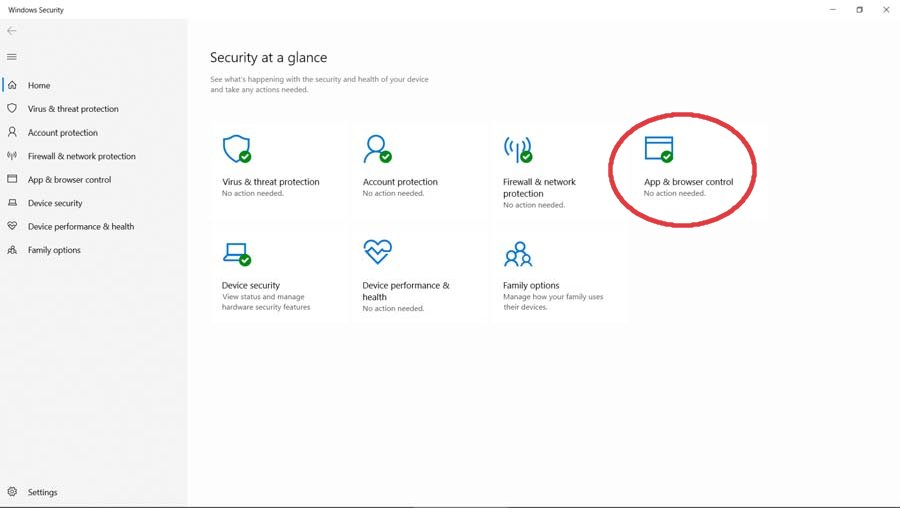
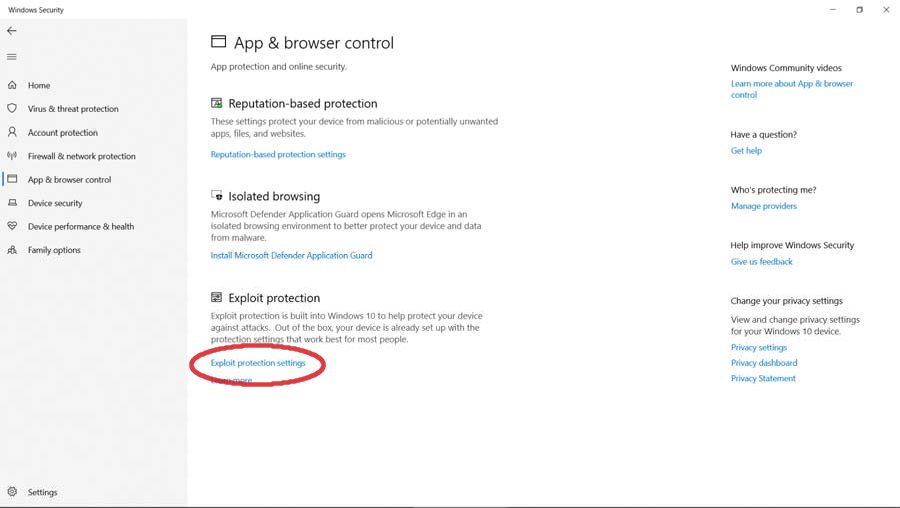
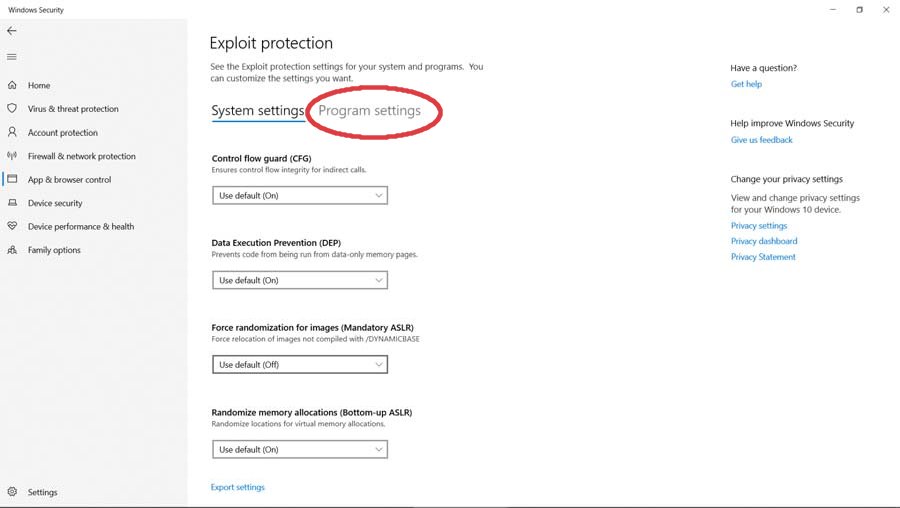
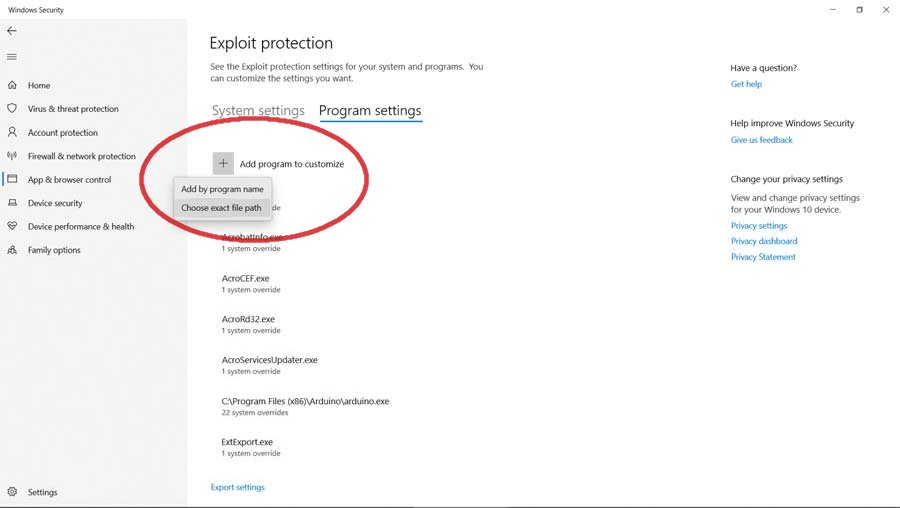
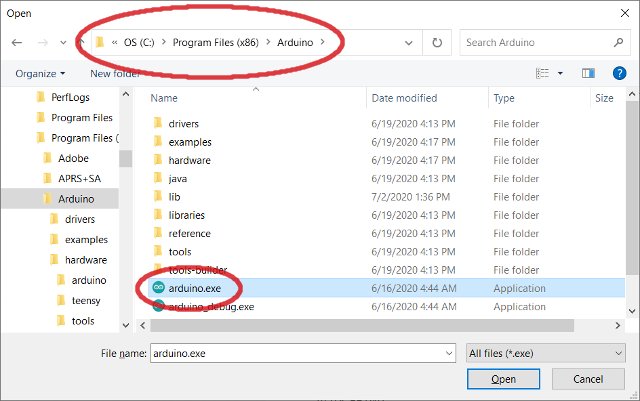
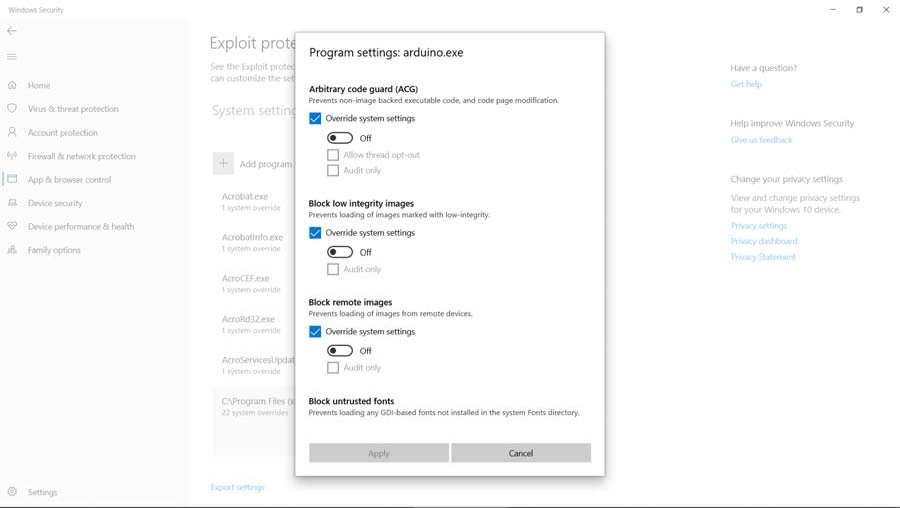
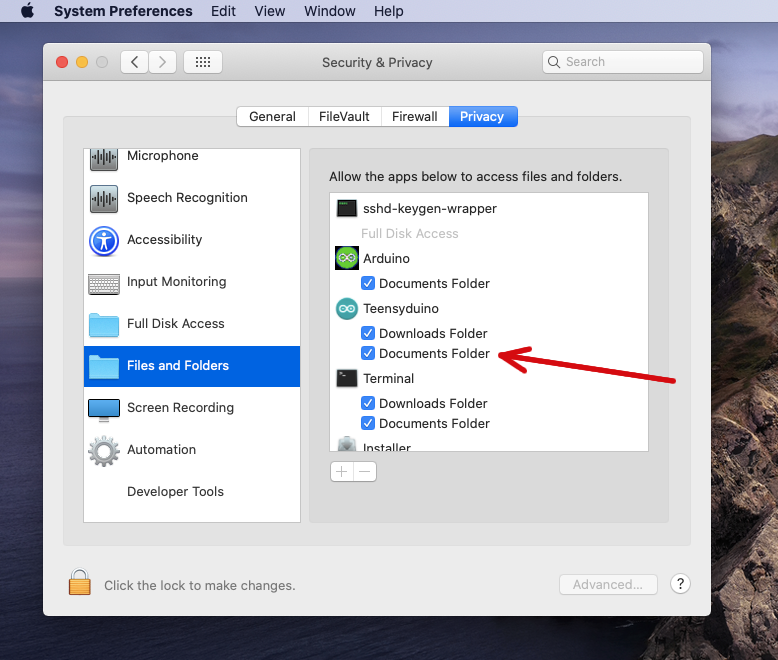
Credits
The Teensyduino installer is based in part on the work of
the FLTK project (http://www.fltk.org).