This clause describes the algorithm and timing relationships for Devices 0 and 1 during the processing of power on and hardware resets.
The timing assumes the following:
a) DASP- is asserted by Device 1 and received by Device 0 at power-on or hardware reset to indicate the presence of Device 1. At all other times it is asserted by Device 0 or Device 1 to indicate when a device is active;
b) PDIAG- is asserted by Device 1 and detected by Device 0. It is used by Device 1 to indicate to Device 0 that it has completed diagnostics without error and is ready to accept commands from the Host (BSY bit is cleared). This does not indicate that the device is ready, only that it can accept commands.
- Power on and hardware resets - device 0
- Power on and hardware resets - device 1
a) Host asserts RESET- for a minimum of 25 m s;
b) Device 0 sets the BSY bit no later than 400 ns after RESET- is negated;
c) Device 0 negates DASP- no later than 1 ms after RESET- is negated;
d) Device 0 samples for at least 450 ms for DASP- to be asserted from Device 1. This sampling starts 1 ms after RESET- is negated;
e) Device 0 performs hardware initialization and diagnostics;
f) Device 0 may revert to its default condition;
g) If Device 0 detected that DASP- was asserted during step d), then Device 0 waits up to 31 s for Device 1 to assert PDIAG-. Sampling of PDIAG- starts 1 ms after RESET is negated. If PDIAG- is asserted within 31 s, Device 0 clears bit 7 equal to zero in the Error Register, else Device 0 sets bit 7 equal to one in the Error Register. If DASP- assertion was not detected in step d) Device 0 clears bit 7 equal to zero in the Error Register. In either case the device shall set the Sector Count register to 01h, the Sector Number register to 01h, the Cylinder Low register to 00h, the Cylinder High register to 00h, and the Device/Head register to 00h. Device 0 shall store whether or not Device 1 was detected in step d) because this information is need in order to process any Software reset or EXECUTE DEVICE DIAGNOSTIC command later;
h) Device 0 posts diagnostic results to bits 6-0 of the Error Register;
i) Device 0 clears the BSY bit when ready to accept commands that do not require the DRDY bit to be equal to 1. Device 0 shall clear the BSY bit no later than 31 s from the time that RESET- is negated;
j) Device 0 sets the DRDY bit when ready to accept any command.
NOTE 23: Steps i) and j) may occur at the same time. While no maximum time is specified for the DRDY bit to be set to one, a host should allow up to 30 s for the DRDY bit to become 1. See Figure 8.
a) Host asserts RESET- for a minimum of 25 m s;
b) Device 1 sets the BSY bit no later than 400 ns after RESET- is negated;
c) Device 1 negates DASP- no later than 1 ms after RESET- is negated;
d) Device 1 negates PDIAG- before asserting DASP-;
e) Device 1 asserts DASP- no later than 400 ms after RESET- is negated;
f) Device 1 performs hardware initialization and diagnostics;
g) Device 1 may revert to its default condition;
h) Device 1 posts diagnostic results to the Error Register.
i) Device 1 clears the BSY bit when ready to accept commands that do not require the DRDY bit to be equal to 1;
j) If Device 1 passed its diagnostics without error in step f), Device 1 asserts PDIAG-. If the diagnostics failed, Device 1 does not assert PDIAG- and continues to the next step. Device 1 shall clear the BSY bit, and optionally assert PDIAG-, no later than 30 s from the time RESET- is negated. The device shall set the Sector Count register to 01h, the Sector Number register to 01h, the Cylinder Low register to 00h, the Cylinder High register to 00h, and the Device/Head register to 00h;
k) Device 1 sets the DRDY bit when ready to accept any command;
NOTE 24: Steps i), j) and k) may occur at the same time. While no maximum time is specified for the DRDY bit to be set to one, a host should allow up to 30 s for the DRDY bit to become 1. See Figure 8.
l) Device 1 negates DASP- after the first command is received or negates DASP- if no command is received within 31 s after RESET- is asserted.
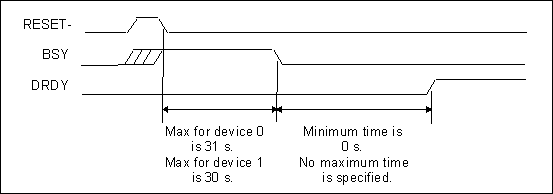
Figure 8 - BSY and DRDY timing for power on and hardware resets
This clause describes the algorithm and timing relationships for Devices 0 and 1 during the processing of software resets.
Note 25: Some devices may require SRST be set for a minimum of 5 m
s.
a) Host sets the SRST bit to one in the Device Control register;
b) Device 0 sets BSY bit no later than 400 ns after detecting that the SRST bit is equal to one;
c) Device 0 performs hardware initialization and diagnostics;
d) Device 0 may revert to its default condition;
e) Device 0 posts diagnostic results to the Error Register;
f) Device 0 waits for the host to clear the SRST bit to zero;
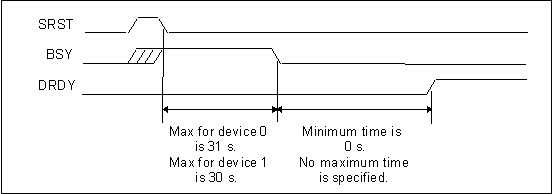
g) If Device 0 detected that Device 1 is present during the most recent power on or hardware reset sequence, then Device 0 waits up to 31 s from the time that the SRST bit to become zero for Device 1 to assert PDIAG-. Sampling of PDIAG- starts 1ms after SRST is cleared to zero. If PDIAG- is asserted within 31 s, Device 0 clears bit 7 equal to zero in the Error Register, else Device 0 sets bit 7 equal to one in the Error Register. If device 1 was not detected during the most recent power up or hardware reset sequence, then Device 0 clears bit 7 equal to zero in the Error register. In either case the device shall set the Sector Count register to 01h, the Sector Number register to 01h, the Cylinder Low register to 00h, the Cylinder High register to 00h, and the Device/Head register to 00h;
h) Device 0 clears the BSY bit when ready to accept commands that do not require the DRDY bit to be equal to 1. Device 0 shall clear the BSY bit no later than 31 s from the time that the host clears the SRST bit equal to zero;
Note 26: Steps g) and h) may occur very rapidly.
i) Device 0 sets the DRDY bit when ready to accept any command.
NOTE 27: Steps h) and i) may occur at the same time. While no maximum time is specified for the DRDY bit to become equal to 1 to occur, a host should allow up to 30 s for the DRDY bit to be set to one. See Figure 9.
a) Host sets SRST bit to one in the Device Control register;
b) Device 1 set the BSY bit no later than 400 ns after detecting that the SRST bit to equal to one;
c) Device 1 negates PDIAG- no later than 1 ms after detecting that the SRST bit is one;
d) Device 1 perform hardware initialization and diagnostics;
e) Device 1 may revert to its default condition;
f) Device 1 posts diagnostic results to the Error Register;
g) Device 1 waits for the host to clear the SRST bit equal to zero;
h) Device 1 clears the BSY bit when ready to accept commands that do not require the DRDY bit to be equal to 1;
i) If Device 1 passed its diagnostics without error in step d), Device 1 asserts PDIAG-. If the diagnostics failed, Device 1 does not assert PDIAG- and continues to the next step. Device 1 shall clear the BSY bit, optionally assert PDIAG-, no later than 30 s from the time the host clears the SRST bit to zero. The device shall set the Sector Count register to 01h, the Sector Number register to 01h, the Cylinder Low register to 00h, the Cylinder High register to 00h, and the Device/Head register to 00h;
j) Device 1 sets the DRDY bit when ready to accept any command.
NOTE 28: Steps h), i) and j) may occur at the same time. While no maximum time is specified for the DRDY bit to be set to one, a host should allow up to 30 s for the DRDY bit to become one. See Figure 9.
Figure 9 - BSY and DRDY timing for software reset