There are three types of reset in ATA. The following is a suggested method of classifying reset actions:
All addressing of data sectors recorded on the device's media is by a logical sector address. The mapping of logical sector addresses to the actual physical location of the data sector on the media is vendor specific.
A device shall support at least one logical CHS translation known as the default translation if the device capacity is less than 8 GB 16 515 072 sectors. The device shall enter this translation following a power-on reset. A device shall support LBA translation regardless of capacity. If the device capacity is greater than 8 GB 16 515 072 sectors, the LBA translation shall be the default translation and the device shall enter this translation following a power-on reset. If the device capacity is greater than 8 GB 16 515 072 sectors, the device may support a CHS translation providing up to 8 GB 16 515 072 sectors of capacity. A device may support other logical translations if the device capacity is less than 8 GB 16 515 072 sectors and the host may use the INITIALIZE DEVICE PARAMETERS command to select the translation. The default translation is described in the Identify Device information. The current translation may also be described in the Identify Device information.
A CHS address is made up of three fields: the sector address, the head number and the cylinder number. Sectors are numbered from 1 to the maximum value allowed by the current CHS translation but can not exceed 255. Heads are numbered from 0 to the maximum value allowed by the current CHS translation but can not exceed 15. Cylinders are numbered from 0 to the maximum value allowed by the current CHS translation but cannot exceed 65 535.
When the host selects a CHS translation using the INITIALIZE DEVICE PARAMETERS command, the host requests the number of sectors per logical track and the number of heads per logical cylinder. The device then computes the number of logical cylinders available in requested translation.
Sequential access to logical sectors shall be accomplished by treating the sector number as the least significant portion of the logical sector address, the head number as the middle portion of the logical sector address and the cylinder number as the most significant portion of the logical sector address.
A device shall not change the addressing method and shall return status information utilizing the addressing method specified for the command.
The following LBA support shall be supported by the device:
LBA = ( (cylinder * heads_per_cylinder + heads ) * sectors_per_track ) + sector - 1
where heads_per_cylinder and sectors_per_track are the current translation values.
The optional Power Management Feature Set permits a host to modify the behavior of a device in a manner which reduces the power required to operate. The Power Management Feature Set provides a set of commands and a timer that enable a device to implement low power consumption modes. A device that implements the Power Management feature shall implement the following minimum set of functions:
Additional vendor specific commands and functions are allowed.
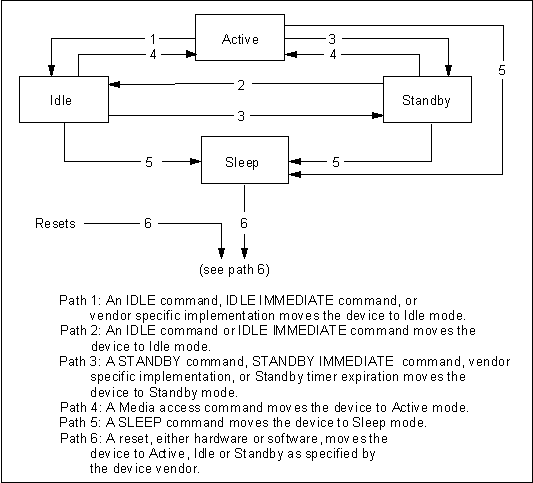
In Active mode the device is capable of responding to commands. During the execution of a media access command a device shall be in Active mode. Power consumption is greatest in this mode.
In Idle mode the device is capable of responding to commands but the device may take longer to complete commands than when in the Active mode. Power consumption may be reduced from that of Active mode.
In Standby mode the device is capable of responding to commands but the device may take longer to complete commands than in the Idle mode. The time to respond could be as long as 30 s. Power consumption may be reduced from that of Idle mode.
In Sleep mode the device requires a reset to be activated. The time to respond could be as long as 30 s. Sleep provides the lowest power consumption of any mode.
The CHECK POWER MODE command allows a host to determine if a device is currently in, going to or leaving Standby or Idle mode.
The IDLE and IDLE IMMEDIATE commands move a device to Idle mode immediately from the Active or Standby modes. The Idle command also sets the Standby Timer count and enables or disables the Standby Timer.
The SLEEP command moves a device to Sleep mode. The device's interface becomes inactive at the completion of the SLEEP command. A reset is required to move a device out of Sleep mode. When a device exits Sleep mode it may enter Active, Idle or Standby mode. The mode selected by the device is based on the type of reset received and on vendor specific implementation.
The STANDBY and STANDBY IMMEDIATE commands move a device to Standby mode immediately from the Active or Idle modes. The STANDBY command also sets the Standby Timer count and enables or disables the Standby Timer.
The Standby timer provides a method for the device to automatically enter Standby mode from either Active or Idle mode following a host programmed period of inactivity. If the Standby timer is enabled and if the device is in the Active or Idle mode, the device waits for the specified time period and if no command is received, the device automatically enters the Standby mode.
If the Standby Timer is disabled, the device may not automatically enter Standby mode.
The transition to Idle mode is vendor specific, and may occur as a result of an IDLE or IDLE IMMEDIATE command, or in vendor specific way.
In Sleep mode, the device's interface is not active. The content of the Status register is invalid in this mode.
Figure 3 shows the minimum set of mode transitions that shall be implemented.
Figure 3 - Power management modes
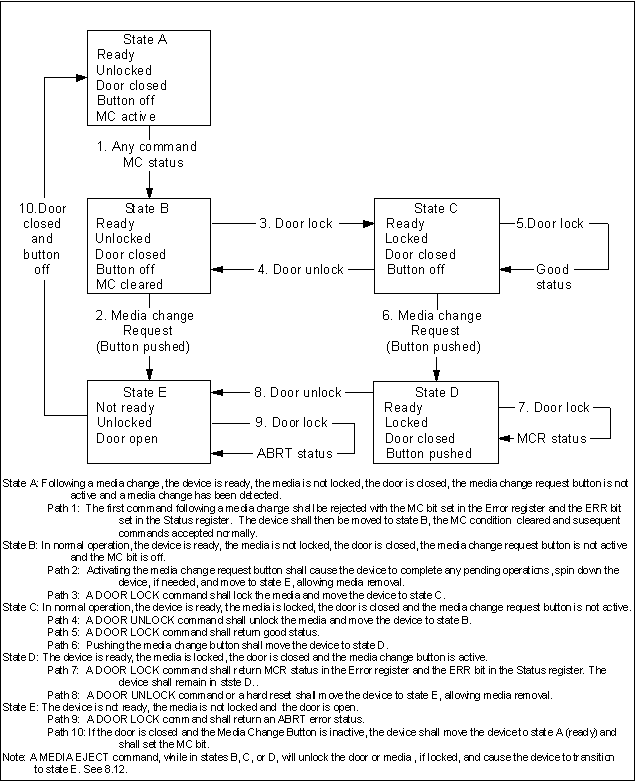
Figure 4 shows the minimum set of mode transitions that shall be implemented by removable media devices which contain a media change request mechanism (button) and support the DOOR LOCK and DOOR UNLOCK commands, and the MC and MCR bits in the Error register.
The Security mode features allow a host to implement a security password system to prevent unauthorized access to the internal disk drive.
The Commands supported by this feature set are:
Support of the Security mode feature set is indicated in IDENTIFY DEVICE response Word 128.
The Master Password shall be set to a vendor specific value during manufactuing and the lock function disabled.
The system manufacturer/dealer may set a new Master Password using the SECURITY SET PASSWORD command, without enabling the lock function.
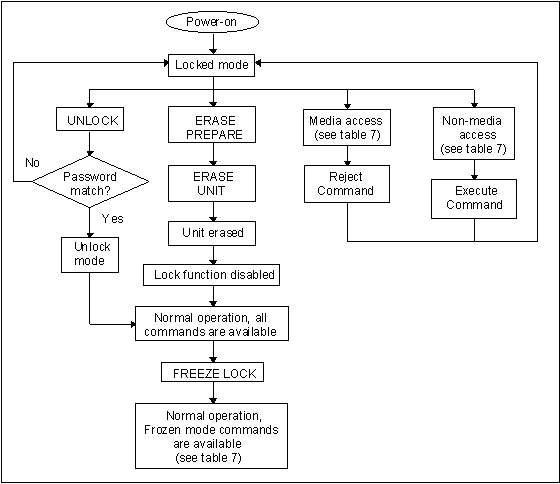
When a user password is set, the device shall automatically enter lock mode the next time the device is powered-on.
When lock is enabled, the device rejects media access commands until an SECURITY UNLOCK command is successfully completed.
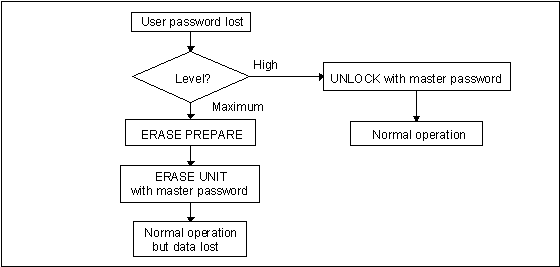
If the user password is lost and High level security is set, the device shall not allow the user to access data. The device shall be unlocked using the master pasword.
If the user password is lost and Maximum security level is set, data access shall be impossible. However, the device shall be unlocked using the ERASE UNIT command with the master password to unlock the device and shall erase all user data.
Figure 5 - Password set Ssecurity mode power-on flow
Figure 6 - User password lost
|
Command |
Locked mode |
Unlocked mode |
Frozen mode |
|
CHECK POWER |
ExecutableExecutes |
ExecutableExecutes |
ExecutableExecutes |
|
DOOR LOCK |
ExecutableExecutes |
ExecutableExecutes |
ExecutableExecutes |
|
DOOR UNLOCK |
ExecutableExecutes |
ExecutableExecutes |
ExecutableExecutes |
|
DOWNLOAD MICROCODE |
ExecutableExecutes |
ExecutableExecutes |
ExecutableExecutes |
|
EXECUTE DEVICE DIGNOSTICS |
ExecutableExecutes |
ExecutableExecutes |
ExecutableExecutes |
|
FORMET TRACK |
AbortedAbort error |
ExecutableExecutes |
ExecutableExecutes |
|
IDENTIFY DEVICE |
ExecutableExecutes |
ExecutableExecutes |
ExecutableExecutes |
|
IDENTIFY DEVICE DMA |
ExecutableExecutes |
ExecutableExecutes |
ExecutableExecutes |
|
IDLE |
ExecutableExecutes |
ExecutableExecutes |
ExecutableExecutes |
|
IDLE IMMEDIATE |
ExecutableExecutes |
ExecutableExecutes |
ExecutableExecutes |
|
INITIALIZE DEVICE PARAMETERS |
ExecutableExecutes |
ExecutableExecutes |
ExecutableExecutes |
|
MEDIA EJECT |
ExecutableExecutes |
ExecutableExecutes |
ExecutableExecutes |
|
NOP |
ExecutableExecutes |
ExecutableExecutes |
ExecutableExecutes |
|
READ BUFFER |
ExecutableExecutes |
ExecutableExecutes |
ExecutableExecutes |
|
READ DMA |
AbortedAbort error |
ExecutableExecutes |
ExecutableExecutes |
|
READ LONG |
AbortedAbort error |
ExecutableExecutes |
ExecutableExecutes |
|
READ MULTIPLE |
AbortedAbort error |
ExecutableExecutes |
ExecutableExecutes |
|
READ SECTORS |
AbortedAbort error |
ExecutableExecutes |
ExecutableExecutes |
|
READ VERIFY SECTORS |
AbortedAbort error |
ExecutableExecutes |
ExecutableExecutes |
|
RECALIBRATE |
ExecutableExecutes |
ExecutableExecutes |
ExecutableExecutes |
|
SECURITY DISABLE PASSWORD |
AbortedAbort error |
ExecutableExecutes |
AbortedAbort error |
|
SECURITY ERASE PREPARE |
ExecutableAbort error |
ExecutableExecutes |
ExecutableAbort error |
|
SECURITY ERASE UNIT |
ExecutableAbort error |
ExecutableExecutes |
AbortedAbort error |
|
SECURITY FREEZE LOCK |
AbortedAbort error |
ExecutableExecutes |
ExecutableExecutes |
|
SECURITY SET PASSWORD |
AbortedAbort error |
ExecutableExecutes |
AbortedAbort error |
|
SECURITY UNLOCK |
ExecutableAbort error |
ExecutableAbort error |
AbortedExecutes |
|
SEEK |
ExecutableExecutes |
ExecutableExecutes |
ExecutableExecutes |
|
SET FEATURES |
ExecutableExecutes |
ExecutableExecutes |
ExecutableExecutes |
|
SET MULTIPLE MODE |
ExecutableExecutes |
ExecutableExecutes |
ExecutableExecutes |
|
SLEEP |
ExecutableExecutes |
ExecutableExecutes |
ExecutableExecutes |
|
SMART DISABLE OPERATIONS |
ExecutableExecutes |
ExecutableExecutes |
ExecutableExecutes |
|
SMART ENABLE/DISABLE AUTOSAVE |
ExecutableExecutes |
ExecutableExecutes |
ExecutableExecutes |
|
SMART ENABLE OPERATIONS |
ExecutableExecutes |
ExecutableExecutes |
ExecutableExecutes |
|
SMART READ THRESHOLDS |
ExecutableExecutes |
ExecutableExecutes |
ExecutableExecutes |
|
SMART READ VALUES |
ExecutableExecutes |
ExecutableExecutes |
ExecutableExecutes |
|
SMART RETURN STATUS |
ExecutableExecutes |
ExecutableExecutes |
ExecutableExecutes |
|
SMART SAVE VALUES |
ExecutableExecutes |
ExecutableExecutes |
ExecutableExecutes |
|
STANDBY |
ExecutableExecutes |
ExecutableExecutes |
ExecutableExecutes |
|
STANDBY IMMEDIATE |
ExecutableExecutes |
ExecutableExecutes |
ExecutableExecutes |
|
WRITE BUFFER |
ExecutableExecutes |
ExecutableExecutes |
ExecutableExecutes |
|
WRITE DMA |
AbortedAbort error |
ExecutableExecutes |
ExecutableExecutes |
|
WRITE LONG |
AbortedAbort error |
ExecutableExecutes |
ExecutableExecutes |
|
WRITE MULTIPLE |
AbortedAbort error |
ExecutableExecutes |
ExecutableExecutes |
|
WRITE SECTORS |
AbortedAbort error |
ExecutableExecutes |
ExecutableExecutes |
|
WRITE VERIFY |
AbortedAbort error |
ExecutableExecutes |
ExecutableExecutes |
The intent of Self-monitoring, analysis and reporting technology (SMART) is to protect user data and minimize the liklihood of unscheduled system downtime that may be caused by predictable degradation and/or fault of the device. By monitoring and storing critical performance and calibration parameters, SMART devices attempt to predict the likelihood of near-term degradation or fault condition. Providing the host system the knowledge of a negative reliability condition, allows the host system to warn the user of the impending risk of a data loss and advise the user of appropriate action. Support of this feature set is indicated in bit 0 of word 82 of the IDENTIFY DEVICE response.
Attributes are the specific performance or calibration parameters that are used in analyzing the status of the device. Attributes are selected by the device manufacturer based on that attribute’s ability to contribute to the prediction of degrading or fault conditions for that particular device. The specific set of attributes being used and the identity of these attributes is vendor specific and proprietary.
Attribute values are used to represent the relative reliability of individual performance or calibration attributes. The valid range of attribute values is from 1 to 253 decimal. Higher attribute values indicate that the analysis algorithms being used by the device are predicting a lower probability of a degrading or fault condition exisiting. Accordingly, lower attribute values indicate that the analysis algorithms being used by the device are predicting a higher probability of a degrading or fault condition existing.
Each attribute value has a corresponding attribute threshold limit which is used for direct comparison to the attribute value to indicate the existence of a degrading or fault condition. The numerical value of the attribute thresholds are determined by the device manufacturer through design and reliability testing and analysis. Each attribute threshold represents the lowest limit to which its corresponding attribute value can be equal while still retaining a positive reliability status. Attribute thresholds are set at the device manufacturer’s factory and cannot be changed in the field. The valid range for attribute thresholds is from 1 through 253 decimal.
If one or more attribute values are less than or equal to their corresponding attribute thresholds, then the device reliability status indicates an impending degrading or fault condition.
The SMART commands provide access to attribute values, attribute thresholds and other logging and reporting information. These commands use a single command code and are differentiated by the value placed in the Features register. See Clause 8.
If the SMART feature set is implemented, SMART ENABLE OPERATIONS, SMART DISABLE OPERATIONS, and SMART RETURN STATUS commands the folloing commands shall be implemented. The implementation of other SMART commands is optional.
If the SMART feature set is implemented, the following commands may be implemented. These commands are not recommended and may be removed in a future ATA standard.
It is recomended that, when used in a system that is utilizing the Power Management Feature set, a SMART enabled device automatically saves its attribute values upon receipt of an IDLE IMMEDIATE, STANDBY IMMEDIATE or SLEEP command. If the device has been set to utilize the Standby timer, it is recommended that the device automatically perform a SMART SAVE ATTRIBUTE VALUES function prior to going from an Idle state to the Standby state.