

Troubleshooting Common Problems
If your question isn't answered here, please post on the forum. PJRC does monitor the forum and every attempt is made to answer customer questions.
You must post code or details needed to reproduce the problem. Please read the posting guidelines. Just a few minutes to compose a detailed question usually results in much better help.
The Teensy Quick Reference: Code Examples, Tips and Tricks list has a list useful resources and solutions for many common projects.
The Most Common Problems
#1: LED Blinks But No USB Communication: Many cell phones are sold with charging-only cables. They have only 2 wires for power, but are missing the 2 data wires. Try another USB cable, ideally one known to work for USB.#2: No COM Port or Serial Device Seen: Teensy uses HID protocol for uploading, not serial. Brand new Teensy boards are shipped with the LED blink example compiled to appear as RawHID. You must program Teensy at least once from Arduino. The COM port (Windows) or Serial Device (Mac, Linux) appears only after Teensy begins running your program. Regular Arduino boards are always serial. Teensy uses HID and supports many protocols. To use serial, make sure the Tools > USB Type menu is set to "Serial", and understand Teensy only becomes a serial device when it runs your program built with this setting.
#3: Dead (usually overheating) Main Chip: More than 4 volts applied to the 3.3V power pin instantly kills a Teensy LC or 3.2. Be extremely careful if connecting circuits to Teensy using both VIN(5V) & 3.3V pins, or when using any external power supply. Loose wires between Teensy and other electonics accidentally touching are the most common way Teensy fails. Just a few extra minutes to cover exposed leads and mechanically secure loose wires, especially if they can easily unplug from a solderless breadboard, can save you from an unpleasant and costly "learning experience".
Unreliable Communication
Some USB hubs have trouble handling the rapid sequence of connect/disconnect events when programming Teensy. Most hubs work fine, but the few that do not can cause very strange problems. If you experience trouble, always try connecting Teensy directly with a quality USB cable.Teensy 3.0 Not Recognized by Teensy Loader
Teensy Loader 1.07 is the first version to support Teensy 3.0. You can check the version using Help > About. Version 1.07 is part of the Teensyduino installer. It automatically runs when you click Upload or Verify in Arduino.Brand New Teensy Not Recognized
When a brand new Teensy has never been recognized by Teensy Loader, follow these steps.- First, reboot your computer and remove any other circuitry connected to the Teensy.
- The LED should blink when the USB cable is plugged in. Every Teensy is pre-programmed with a LED blink program during product testing. No drivers or software on your computer are needed for the LED blink. Only power from the USB cable is necessary. If the LED does not blink, check the voltage on the board using a voltmeter, or try another cable or USB port, and avoid any USB hubs. If the LED never blinks, do not worry about drivers or software. No LED blink indicates the board is not receiving power!
- When the pushbutton is pressed, the LED should stop blinking. No software or drivers on your computer are necessary for the button to stop the LED blink. When the LED blinks and the pushbutton causes the blinking to stop, this is a very good indication your Teensy hardware is functioning properly.
- When the LED stops blinking, if the Teensy Loader program is running, it should detect the Teensy board. The "Press Button To Activate" message will disappear and the image will show which board is present. No drivers need to be installed on Windows or Mac for this to work. On Linux, the udev rule file must be installed. If the LED blinks, and the pushbutton stops the blinking, but Teensy Loader never detects your board, and you've followed the steps above, the problem is almost certainly a faulty USB cable. Many USB cables made for charging devices have only power wires but no data lines.
- On Windows, the driver installation is only necessary for using the Arduino Serial Monitor when Teensy implements a Serial device (from the Tools > USB Type menu), and to automatically reprogram using "Upload" when Teensy has been programmed as Serial. Without the driver, 5 seconds after you click Upload, a message will appear asking you to press the pushbutton on your Teensy. Windows may give you misleading errors indicating drivers must be installed, but NO DRIVER IS NECESSARY on Windows to simply get Teensy Loader to recognize your Teensy and program new code. Follow steps 1-3 above before worrying about drivers!
Teensy Not Recognized by Teensy Loader
A previously working board may seem to be dead, but the problem may simply be code on your Teensy which confuses your PC's USB port.- Physically disconnect the Teensy.
- Reboot your computer (complete power off is best)
- Make sure the Teensy Loader application is running.
- Hold the reset button down, before plugging in the USB cable.
- Plug the USB cable in while continuing to hold the button.
- After the cable is fully inserted, release the button.
On Windows systems, "strange" problems are occasionally reported, where Windows will not detect new devices. It does not seem to be unique to Teensy. Creating a new user account sometimes solves the problem. Plugging the cable into different USB ports can also help. Rebooting is always a good idea. The best approach is to try on a Mac or Linux machine, or a different Windows machine.
No Serial Port While Programming
This is normal. Teensy is NOT natively a serial device.Arduino boards appear as a serial device for all programming and communication. Arduino remains connected as a serial device while it reboots. Teensy is a native USB device. Experience troubleshooting Arduino does not apply to Teensy!
During programming, Teensy appears as a HID device. When Teensy reboots, electrically your computer sees Teensy disconnect, as if the cable were physically unplugged. When Teensy begins running your program, the USB is disconnected.
The fast and slow LED blink examples do not enable the USB port.
When programs do use USB, type of device Teensy becomes depends on the code you have loaded. Your computer will see a new USB device connect when your program begin using the USB port. In Arduino, the device type is controlled by the Tools > USB Type menu. In C language, the USB code you use determine the type of device. The hid_listen program only responds to specific C programs. While troubleshooting, you must look for the type of device which your program implements.
TODO: list of C code and Teensyduino device types, VID/PID numbers for each.
Pushbutton Does Not Reset Application
The pushbutton lets you to manually put Teensy into programming mode. With Arduino, this happens automatically when you click Upload. But if your code disables the USB port, or disables interrupts, or enters a deep sleep mode which stop the CPU, Teensy can not respond to the USB-based reboot request.Every Teensy is made with a physical pushbutton to allow recovery from a not-responding program.
The pushbutton does NOT reset Teensy to restart your application. However, if Teensy is connected to your computer, and Teensy Loader is running and configured for automatic mode (the default when used with Arduino), pressing the button will enter programming mode. Teensy Loader will quickly reprogram and restart your Teensy. This restart of your application is due to Teensy Loader's "auto" mode, not only the pushbutton.
LED Blinks Green or Blue
You have a counterfeit board. PJRC has never made any Teensy with a green or blue LED. If you purchased using Ebay and Paypal, we recommend you immediately begin a dispute on Paypal's website. Do not bother contacting the seller. They have already scammed many other people with defective boards, but they simply do not care. A dispute on Paypal is the only way you will recover your money. The sooner you file the dispute, the better your odds of receiving a refund. We recommend waiting to leave negative feedback until after Paypal returns your money.Large Programs Mysteriously Crash
On Teensy 2.0, the compiler places string constants in RAM. If you have have many, RAM can run out quickly. In Arduino, you can use F() to cause strings used with print() to avoid using RAM.
void loop() {
  Keyboard.print(F("This is long string does not use RAM, due to F()");
  Serial.println(F("Another string"));
  delay(250);
}
In C language, usually PSTR() is used, and special functions which access flash memory must be called. Often they have a "_P" suffix.
Large data tables or arrays can also cause trouble. If data is constant, PROGMEM and pgm_read_byte() can be used. See the avr-libc manual for details.
Teensy LC, 3.0, 3.1 do not have this problem. Variables defined with "const" are placed only in flash memory, but can be accessed normally. Only the older 8 bit AVR-based boards require these special steps to prevent strings and read-only variables from consuming limited RAM.
Windows: Serial Driver Installed But Not Used
On Windows, even if the serial driver installer has run correctly, sometimes Windows will retain old information in its registry and fail to load the driver. The Device Manager will show "USB Serial" with an error, instead of "USB Serial (Communication Class, Abstract Control Model)" with a COM port number assigned.
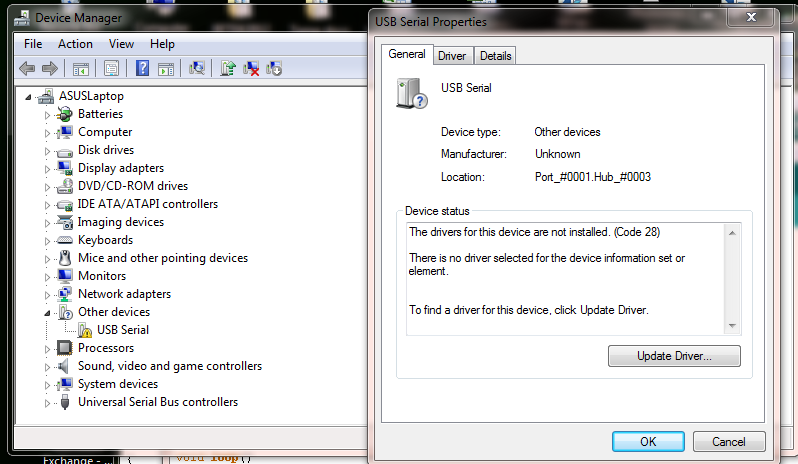
These actions usually can cause Windows to re-detect the device and begin using the correct driver.
- Run the serial installer program again, or run the Teensyduino installer and use the update driver option on the first step.
- Click that "Update Driver" button in the device manager. If the driver installer has run, Windows should be able to find the driver.
- Plug the cable into a different USB port. The Windows Registry handles each physical port with separate registry entries.
- Do and/all of the above with or without the device connected. Sometimes Windows will do things differently if the device is present or absent.
If there is no "USB Serial" at all, please rememober Teensy only becomes a Serial device when programmed to do so. See "No Serial Port While Programming" above.
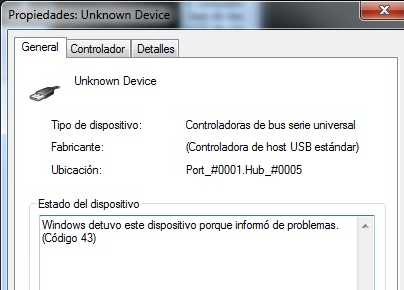
Windows 7: Unknown Device (Code 43)
Windows "Code 43" is a mystery. Other devices, even Apple iPod, have experienced this problem. The solution seem to be be completely powering down, and if a latop, remove the battery for a few minutes. This same solution has been reported multiple times with success.This code 43 error is a mystery. It might be related to laptops entering suspend mode? If you have any insight, please contact us!
Pieter Rautenbach found a case where programming the wrong HEX file (compiled for a different chip) causes error 43.
Windows: Teensy Loader Window Does Not Appear
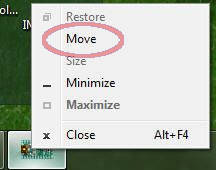
On Windows, if multiple monitors are used and then only a single monitor is later used (eg, a laptop used at a docking station), the Teensy Loader may attempt to appear on the missing monitor. The Teensy Loader appears in the Windows Task Bar, but not on the screen.- Windows 7: Hold the shift key and right click on the Teensy Loader in the Task Bar.
Windows Vista & XP: Right click on the Teensy Loader in the Task Bar. - Select "Move".
- Use your keyboard arrow keys to move the window until it appears.
Additional info from Gilbert Hersschens:
"Since you can't see the missing window, you won't know for sure if it's visible or hidden. But you can see this in the context menu. When the window is shown on the missing display, the menu item "Move" will be active and the item "Restore" will be greyed out. When it's hidden, it will be just the opposite. You can only move a window in its visible state. To hide or unhide a window, you can click on the icon in the taskbar to toggle its state or use the corresponding menu items in the context menu.
Linux: Gentoo & Arch AVR Toolchain
The AVR toolchains provided by Gentoo and Arch are broken. They compile .hex files which simply do not work! Starting with version 1.0.1, Arduino downloading from www.arduino.cc has a known-good toolchain.If running avr-gcc with a makefile, download Arduino 1.0.1 and set your $PATH to access the toolchain in arduino-1.0.1/hardware/tools/avr/bin directory.
Linux: Long Delay Before USB Serial Detected
On some Linux systems, USB Serial is detected very slowly. The kernel detects the device quickly (usually seen with "tail -f /var/log/messages"), but the device files do not appear for a very long time.Edit "/lib/udev/rules.d/77-nm-probe-modem-capabilities.rules", adding this line:
SUBSYSTEMS=="usb", ATTRS{idVendor}=="16c0", ATTRS{idProduct}=="04[7-9]?", GOTO="nm_modem_probe_end"
Linux: Many Duplicate Device Names with Ubuntu 9.10
On Ubuntu 9.10 (and maybe other systems), when using a serial device type, the kernel assigns a new number each time, /dev/ttyACM0, /dev/ttyACM1, /dev/ttyACM2, etc.This is caused by the Gnome Modem Manager, which holds the port in (as far as the kerel is concerned) use even after you have reset the Teensy and the port no longer exists. The simplest solution is to uninstall Modem Manager, and restart the network manager or simply reboot.
apt-get remove --purge modemmanager
You could also try deleting /usr/lib/ModemManager/libmm-plugin-generic.so and of course reboot. This might leave Modem Manager able to work with most modems, but not interfere with Teensy.
Modem Manager's troublesome probing and inability to configure exclusions for specific device is a known bug. Hopefully it will be fixed in future releases.