A group of industry representatives met at Del Webb's High Sierra Hotel and Casino at Lake Tahoe, Nevada, in late 1985 to see if companies could cooperate in developing a common file system format for CD-ROM. The result of this series of meetings was the High Sierra format. This format is fully specified by the May 28, 1986 Working Paper for Information Processing--Volume and File Structure of Compact Read-Only Optical Discs for Information Interchange. For obvious reasons, this is known as the High Sierra paper.
The world at large then wanted to adopt an equivalent standard. The International Organization for Standardization pushed High Sierra through its standardization process, resulting in the international standard known as ISO 9660. (The organization is called the International Organization for Standardization, but the standard is ISO 9660 .) This standard is described in the paper ISO 9660--Volume and File Structure of CD-ROM for Information Interchange, known in the CD-ROM trade as the ISO standard.
Apple's Macintosh operating system and GS/OS, plus Microsoft's operating system MS-DOS, support both the ISO 9660 standard and the older High Sierra format.
ISO 9660 is the wave of the future--many existing CD-ROMs use the High Sierra format, but everyone is changing over to the ISO 9660 standard, and most if not all future discs will be in ISO 9660 format rather than High Sierra format. In the meantime, because "ISO 9660" doesn't roll off the tongue quite as nicely as "High Sierra," many people in the industry say "High Sierra" when they really mean "ISO 9660" or "whatever that damn format is that my CD-ROM is supposed to be in." In this article, I do not use the terms interchangeably,but explicitly state which format I'm referring to. But for practical purposes, what I say about one format also applies to the other, with the exceptions I note.
The ISO 9660 standard and the older High Sierra format define each CD-ROM as a volume. Volumes can contain standard file structures, coded character set file structures for character encoding other than ASCII, or boot records. Boot records can contain either data or program code that may be needed by systems or applications. ISO 9660 and High Sierra specify
how to describe an arbitrary location on the volume--the logical format of the volume; how to format and what to include in the descriptive information contained by each volume about itself--the volume descriptors; how to format and what to include in the path table, which is an easy way to get to any directory on the volume; how to format and what to include in the file directories and the directory records, which contain basic information about the files on the volume such as the filename, file size, file location, and so forth.
The discussion that follows is a reasonably technical description of the standards in each of these areas; it is not the definitive description. For the one true, proper definition of the standards, read the original specifications.
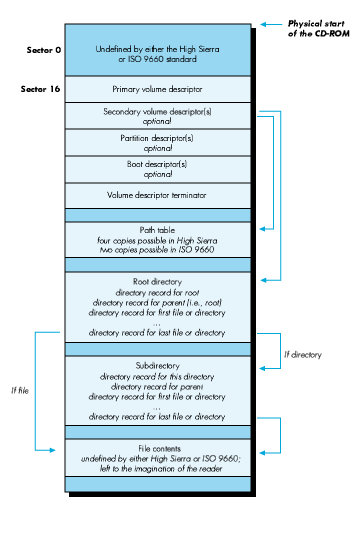
CD-ROMs are laid out in 2048-byte physical sectors. This physical layout is defined in a standard published by Philips and Sony known as the Yellow Book, and is independent of the type of volume formatting used. Under ISO 9660 and High Sierra, the CD is also laid out in 2048-byte logical sectors. Both formats also have the concept of a logical block, which is the smallest chunk of file data. A logical block can be 512, 1024, or 2048 bytes. In general, file access information is laid out in sector-sized units, while actual file data is laid out in block-sized units. On most CDs, the block size is the same as the sector size at 2048 bytes, so this distinction isn't important. Figure 1 shows the layout of a volume in ISO 9660 or High Sierra format.
|
| Figure 1: A Volume in ISO 9660 or High Sierra Format |
Information about the volume itself is contained in an array of 2048-byte entries, beginning at logical sector 16 on the disc, as shown in Figure 1. These are the volume descriptors. There are five types of volume descriptors: the primary volume descriptor, the secondary volume descriptor, the boot descriptor, the partition descriptor, and the volume descriptor terminator. Every volume descriptor is 2048 bytes long (one sector). The first descriptor in the array is always a primary volume descriptor, and the last descriptor always a volume descriptor terminator. The other three volume descriptor types are optional. The boot descriptor and the partition descriptor aren't supported by the Macintosh, because the Macintosh boot code looks at the beginning of the disk for boot tracks, not at sector 16.
Each volume has one and only one primary volume descriptor. This descriptor consists of the volume name, some publishing information, and offsets to the path table and root directory. The primary volume descriptor also contains a copy of the root directory entry (to minimize the number of seeks necessary to find out information about a disc). In the directory structure pointed to by the primary volume descriptor, filenames can consist of the uppercase characters A through Z, the underscore, and the digits 0 through 9. This is a subset of ISO 646, an international character representation standard roughly equivalent to ASCII. You will see a sample primary volume descriptor later in this article in the section entitled "A Simple Formatting Program: ISO 9660 Floppy Builder."
A volume can have zero or more secondary volume descriptors . The purpose of the secondary volume descriptor is to enable you to press a CD-ROM that can display the directories in a nonroman character set, such as Japanese Kanji, Hebrew, or Arabic. In the directory structure pointed to by the secondary volume descriptor, the characters used to represent filenames are not restricted to ISO 646. This directory structure is separate from but parallel to the directory structure pointed to by the primary volume descriptor. The secondary volume descriptor contains the same information as the primary volume descriptor--although in a different alphabet--in all but two fields. ThevolumeFlag field is used to indicate whether a non-ISO-standard alphabet is being used. The escape Sequences field contains characters that define which alphabet is being used.
The files ISO 9660 File Access and High Sierra File Access each contain a resource used to determine if the Macintosh should use a secondary volume descriptor. The NRVD resource contains a word for the volumeFlags field, followed by 32 bytes for the escapeSequences field. If a secondary volume descriptor exists, and if the volume flags and escape sequences match those in the NRVD resource, then the secondary volume descriptor is used instead of the primary volume descriptor. The boot descriptor was designed to allow the creator of a CD-ROM to include system information for booting from that CD-ROM. This descriptor is not supported on the Macintosh, since the Macintosh operating system looks for boot information at the beginning of the disk, in the area undefined by ISO 9660 and High Sierra. The partition descriptor is also unsupported on the Macintosh.
The volume descriptor terminator is a simple structure that serves to indicate the end of the volume descriptor array. Each volume contains one, and only one, volume descriptor terminator.
The path table describes the directory hierarchy in a compact form, containing entries for each of the volume's directories. Its purpose is to minimize the number of seeks necessary to get to a file's directory information. The Macintosh caches the path table in memory, enabling to any directory with only a single seek.
ISO 9660 allows up to two identical copies of the path table to be stored on the disc, while High Sierra allows up to four copies. This is useful to operating systems that do not cache the path table in memory. In this case, copies of the path table can be stored at regular intervals on the disc--say a quarter of the way in and again three-quarters of the way in--to decrease the seek time necessary for the optical read head to find one of the copies.
The path table for a simple formatting program is shown later in this article.
Directories are stored in a hierarchical tree. Each volume has a root directory, the parent to all other directories on the volume. Subdirectories can be nested up to eight levels deep (the root plus seven levels). Directory records are the basic unit of information kept about each file. Each directory record contains the offset from the beginning of the disc to the file itself, the size of the file, date and time information for creation and modification, file attribute flags, information useful for interleaved files, and the filename (preceded by a length byte). There is also an optional extension field, used by the Macintosh and Apple II operating systems to store additional information not defined by the High Sierra and ISO 9660 formats but necessary to the operating system. A directory record for a simple formatting program is shown later in this article.
Additional file information necessary for multiuser operating systems such as the UNIX operating system or VMS is retained in a separate field known as the extended attribute record. Extended attribute records are recognized by the Macintosh, but they are ignored since they contain information that is irrelevant to it.
A file identifier consists of a filename, a period, a file extension, a semicolon, and a file version number. File identifiers can use the uppercase English alphabet, numbers, and the underscore character (_), and can be up to 31 characters long. Either the filename or file extension can be missing, but not both; if the extension is missing, the period must still precede the semicolon; and the version number must exist. This means that valid file identifiers look like THIS_FILE.EXISTS;1 or .ONLYEXTENSION;1 but that file identifiers like or NO_VERSION are invalid. Both standards define a level-1 conformance, designed for compatibility with MS-DOS, that restricts filenames to eight characters, a period, three characters, a semicolon, and a version number.
There are two types of files: regular files and associated files. A regular file without an associated file is simply a stream of bytes, like the files used in an operating system such as the UNIX ® operating system or MS-DOS. An associated file is a file with the same name as a regular file, and with the associated file attribute bit set in the directory record. This scheme accommodates the data and resource forks of a Macintosh file, as we'll discuss later.
The differences between ISO 9660 and High Sierra are slight, and mostly of interest to programmers. They are as follows:
The primary and secondary volume descriptors differ in the type and number of fields they accommodate. In ISO 9660, a bibliographic preparer field was added to the primary and secondary volume descriptors. Up to four copies of the path table are allowed in High Sierra, but only two copies in ISO 9660. Two fields changed position in the directory records in ISO 9660. All date/time fields have an extra byte in ISO 9660, used to describe the 15- minute offset from Universal Standard Time (GMT or UTC). The order of directory records is slightly different in ISO 9660. In High Sierra, the associated file comes after the regular file with which it is associated; in ISO 9660, the associated file comes first.
Like ISO 9660 and High Sierra file identifiers, HFS filenames can have a maximum of 31 characters. HFS filenames differ from valid ISO 9660 and High Sierra file identifiers in the following ways:
HFS does not distinguish between uppercase and lowercase letters; the names "forecast," "Forecast," and "FoReCaSt" all refer to same file. HFS allows any character to be used in a filename except the colon (:). This means that filenames such as "My payroll file" or "Åéîøü" are perfectly acceptable on the Macintosh. In HFS there is no concept of a filename extension. File types are stored as part of the Finder information. These differences mean that many HFS filenames are illegal in ISO 9660 or High Sierra format. This may cause problems in an application that depends on hard-coded filenames. For example, Hypercard requires that the home stack be named HOME, but this is illegal in ISO 9660 and High Sierra. The legal ISO 9660 or High Sierra name is HOME.;1, which won't be found by Hypercard. Some versions of Videoworks depend upon sounds being in a file named Sounds. The only solution is to have the user copy such files over to an HFS volume and rename them.
As a developer, you don't have to worry about files on an ISO 9660 or a High Sierra CD-ROM looking different to your application. You may have to worry about filenames, if you have hard- coded a particular filename into your application (which is always a bad idea anyway.) Except for the icons not showing up properly (a major exception), your users don't really see a difference between ISO 9660, High Sierra, and HFS-format CD-ROMs. Names are reported back to the Finder exactly as found on the High Sierra or ISO 9660 volume; they are not altered in any way, except that they are truncated at 3 1 characters if they started out longer.
A CLOSER LOOK AT THE CODE Let's look at the C structures we'll use to implement ISO 9660. We need three basic data structures: the primary volume descriptor, the path table, and the directory record. A primary volume descriptor has the basic data for the entire volume. It looks like this in C:
typedef unsigned char Byte;
typedef unsigned short Word;
typedef unsigned long Long;

typedef struct
{
	Byte	VDType;				/* Must be 1 for primary volume descriptor. */
	char	VSStdId[5];			/* Must be "CD001". */
	Byte	VSStdVersion;			/* Must be 1. */
	Byte	volumeFlags;			/* 0 in primary volume descriptor. */
	char	systemIdentifier[32];		/* What system this CD-ROM is meant for. */
	char	volumeIdentifier[32];		/* The volume name. */
	char	Reserved2[8];			/* Must be 0's. */
	Long	lsbVolumeSpaceSize;		/* Volume size, least-significant -byte order. */
	Long	msbVolumeSpaceSize;		/* Volume size, most-significant -byte order. */
	char	escapeSequences[32];		/* 0's in primary volume descriptor */
	Word	lsbVolumeSetSize;		/* Number of volumes in volume set (must be 1). */
	Word	msbVolumeSetSize;
	Word	lsbVolumeSetSequenceNumber;	/* Which volume in volume set (not used). */
	Word	msbVolumeSetSequenceNumber;
	Word	lsbLogicalBlockSize;		/* We'll assume 2048 for block size. */
	Word	msbLogicalBlockSize;
	Long	lsbPathTableSize;		/* How many bytes in path table. */
	Long	msbPathTableSize;
	Long	lsbPathTable1;			/* Mandatory occurrence.  */
	Long	lsbPathTable2;			/* Optional occurrence. */
	Long	msbPathTable1;			/* Mandatory occurrence.  */
	Long	msbPathTable2;			/* Optional occurrence. */
	char	rootDirectoryRecord[34];	/* Duplicate root directory entry. */
	char	volumeSetIdentifier[128];	/* Various copyright and control fields follow. */
	char	publisherIdentifier[128];
	char	dataPreparerIdentifier[128];
	char	applicationIdentifier[128];
	char	copyrightFileIdentifier[37];
	char	abstractFileIdentifier[37];
	char	bibliographicFileIdentifier[37];
	char	volumeCreation[17];
	char	volumeModification[17];
	char	volumeExpiration[17];
	char	volumeEffective[17];
	char	FileStructureStandardVersion;
	char	Reserved4;			/* Must be 0. */
	char	ApplicationUse[512];
	char	FutureStandardization[653];
} PVD, *PVDPtr;
The path table looks like this in C:
typedef char   dirIDArray[8];

typedef struct
{
	byte	len_di;				/* Length of directory identifier.  */
	byte	XARlength;			/* Extended attribute record length. */
	Long	dirLocation;			/* First logical block where directory is stored. */
	Word	parentDN;			/* Parent directory number. */
	dirIDArray  dirID;			/* Directory identifier: actual length is */
						/* len_di; there is an extra blank */
						/* byte if len_di is odd. */
} PathTableRecord, *PathTableRecordPtr;
Notice that this strucure is difficult to describe in C,
because C requires that arrays of characters have a fixed
size, and the character arrays in these records are variable
in size. The path table records are packed together,
so you'll see some grungy code to move a pointer along in the
variable records of the path table.
The directory record looks like this in C:
typedef struct
{
	char	signature[2];			/* $41 $41 - 'AA' famous value. */
	byte	extensionLength;		/* $0E for this ID. */
	byte	systemUseID;			/* 02 = HFS. */
	byte	fileType[4];			/* Such as 'TEXT' or 'STAK'.  */
	byte	fileCreator[4];			/* Such as 'hscd' or 'WILD'.  */
	byte	finderFlags[2];
} AppleExtension;

typedef struct
{
	byte	len_dr;				/* Directory record length. */
	byte	XARlength;			/* Extended attribute record length. */
	Long	lsbStart;			/* First logical block where file starts. */
	Long	msbStart;
	Long	lsbDataLength;			/* Number of bytes in file. */
	Long	msbDataLength;
	byte	year;				/* Since 1900. */
	byte	month;
	byte	day;
	byte	hour;
	byte	minute;
	byte	second;
	byte	gmtOffset;			/* 15-minute offset from Universal Time. */
	byte	fileFlags;			/* Attributes of a file or directory. */
	byte	interleaveSize;			/* Used for interleaved files. */
	byte	interleaveSkip;			/* Used for interleaved files. */
	Word	lsbVolSetSeqNum;		/* Which volume in volume set contains this file. */
	Word	msbVolSetSeqNum;
	byte	len_fi;				/* Length of file identifier that follows. */
	char	fi[37];				/* File identifier: actual is len_fi. */
						/* Contains extra blank byte if len_fi odd. */
	AppleExtension apple;			/* This actually fits immediately after the fi[] */
						/* field, or after its padding byte. */
} DirRcd, *DirRcdPtr;
Again, this structure is difficult to describe in C. The directory records are packed into 2048-byte blocks. No directory record is allowed to span a block, so any extra bytes at the end of a directory record block are ignored. We'll ignore such details in this simple example. Our basic flow of control is simple. The core of the program is in the file BuildISO.c. (SeeCreateAVolume for the main core code.) When we get a floppy, we check to see if it is formatted. If so, we ask the user if he or she wants to continue (to make sure we don't accidentally destroy a useful floppy). We create a primary volume descriptor (by callingCreatePVD) and fill in most of the fields with blanks. We create a simple path table. Because we don't have any subdirectories, we can build an extremely simple path table with only one entry (for the root). We make a copy of the path table in both least-significant-byte and most-significant-byte order.
At this point, we loop, prompting the user for a filename. (See the routine CreateFiles for details.) When the user selects a file, we get the Finder information for that file (GetFileInfo) and check to see if the file has a resource fork. If the file has a resource fork, we create an associated file directory record, and copy the resource fork to the floppy. We always create a regular file, even if the file in question has no data fork. (This is an arguable point. The Macintosh ISO 9660 support works fine on files with only an associated file, but users of other operating systems get bothered by the fact that files consisting of only an associated file don't show up in their directory listings. Creating a regular file, even if the data fork is empty, ensures that the same number of files shows up on the Macintosh and MS-DOS or other operating systems.)